
Did you know your restaurant could be losing money at the POS counter?
The problem may not be your pricing, food cost, or staff. It could be the way your POS talks — or doesn't talk — to your payment terminal.
The problem may not be your pricing, food cost, or staff. It could be the way your POS talks — or doesn't talk — to your payment terminal.
A plain-language guide. Every number here is correct as of 24 August 2026 and will change. Check with your bank before you plan around it.
The two machines on your counter
Go stand at your counter at 10 o'clock on a Saturday night. You will see two machines.
The billing machine knows everything. Table 14. Two biryanis, one paneer, three cokes. Tax. Discount. Total ₹4,380.
The card machine knows nothing. It just sits there waiting for someone to type a number into it.
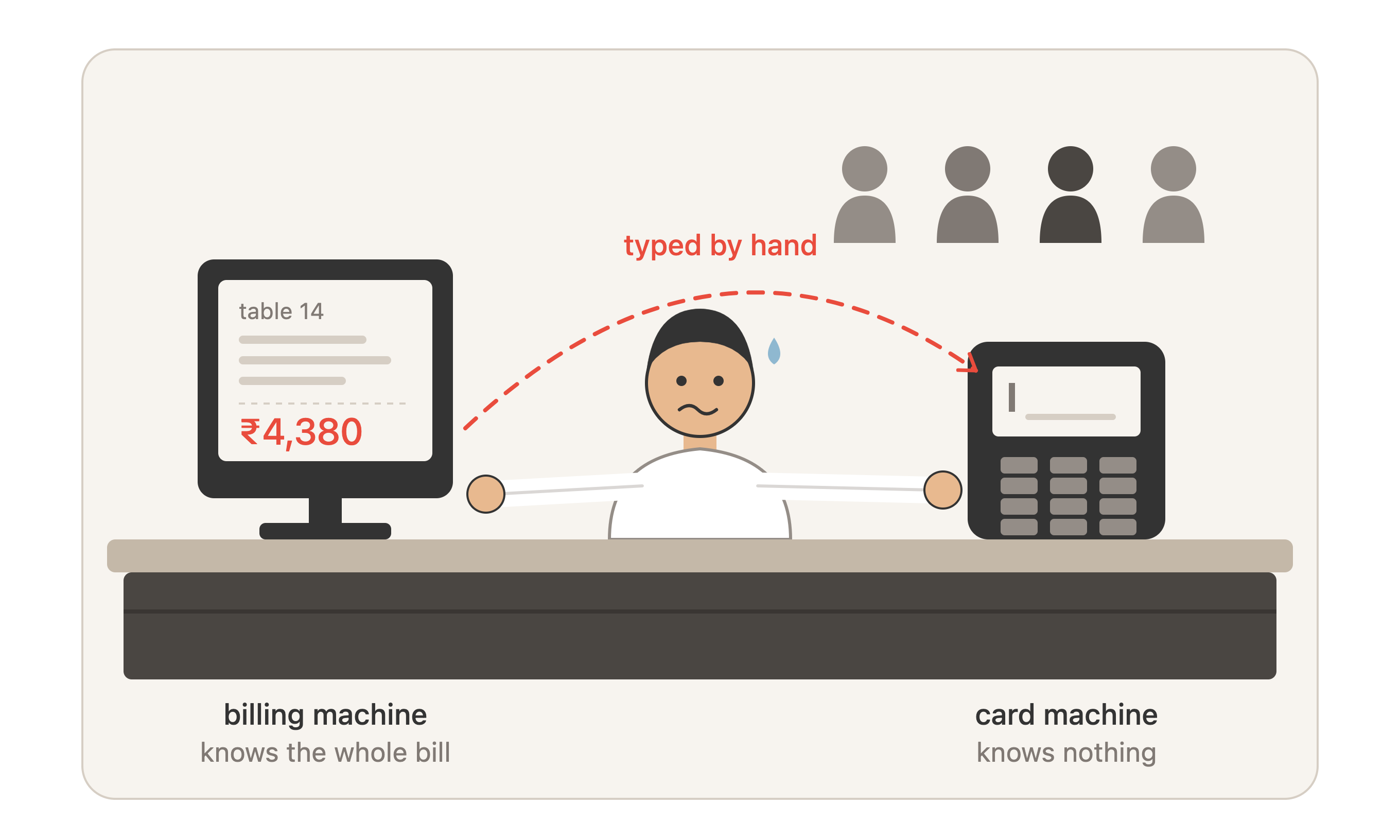
Between those two machines sits your cashier, at speed, with a queue behind him. He reads ₹4,380 off one screen and types it into the other.
That typing is the whole problem.
Why one small step causes so much trouble
When your cashier types the amount by hand, you no longer have one record of your sales. You have two — the billing machine's record and the card machine's record — and they never quite agree.
So every night, someone has to sit down and find the difference. Usually your manager. Usually at 11:30 pm when he wants to go home.
He prints the card machine's day total. He prints the billing software's card total. They don't match. Short ₹2,150 on Tuesday. Over ₹640 on Wednesday. Short ₹3,900 on Saturday.
Then he goes through the charge slips one by one against the bills. Seventy card payments takes about half an hour. Every day. Roughly 30 hours a month of your manager's time, spent copying numbers.
And here is the part that hurts.
Matching totals doesn't catch theft. Suppose one guest pays ₹4,380 by card but the cashier marks that bill as "cash" and takes ₹4,380 out of the drawer. Then another guest pays ₹4,380 cash and the cashier marks that one "card." Two lies. The day's total still matches perfectly. The manager finds nothing. The money is gone.
Comparing totals only tells you something is wrong. It cannot tell you what.
Where the money actually goes
Here are the common ways money walks out. Every one of them needs the two machines to be disconnected. Connect them, and these either stop or become visible.
1. The wrong amount gets typed. ₹1,450 becomes ₹145. Nobody notices, because guests only complain when they're charged too much. Undercharges are never reported. They just quietly bleed.
2. Food goes out with no bill. The order goes to the kitchen. The guest pays on the card machine. The bill is then cancelled in the billing software. The card machine got the money — but it will land in your bank account, and it won't show in your sales. Your stock shows the food left. Your sales don't show it was sold.
This one is dangerous beyond just the money. Your bank sees the card income. Your GST return doesn't. That mismatch is not something you want to explain later.
3. Card payment marked as cash. Explained above. The cashier takes cash out of the drawer to match. The drawer balances. Nobody compares the drawer to the bank.
4. The bill is cancelled after payment. Payment taken, bill settled, then the bill is voided or a big discount is added, and the difference comes out of the drawer. Watch for cancellations and discounts that cluster in the last hour of service, under one person's login.
5. Tips disappear. The guest adds a tip on the card machine. The billing software never sees it. So your tip pool is calculated from the wrong number. Your good staff notice this before you do, and they leave.
6. A payment never reaches your bank. A card machine doesn't get closed out properly at night and one transaction drops off. One ₹6,000 table on a Saturday. Nobody looks at Saturday again.
7. Your bank quietly raises its cut. You agreed 1.75%. Six months later you're paying 1.95% on some cards. Nobody at the outlet is checking, because checking means doing a calculation every month that nobody has time for. On ₹8 lakh of monthly credit card sales, that small change is ₹19,000 a year.
What this is worth in rupees
For a restaurant doing ₹34 lakh a month. These are estimates, not measurements — but they are the right size.
| Where it goes | Per month |
|---|---|
| "Counter difference" written off at ₹1,200/day | ₹36,000 |
| Wrong amounts typed | ₹770 |
| Bank's cut quietly creeping up | ₹1,600 |
| Manager's time on manual matching | ₹10,500 |
| Total | ₹48,870 |
Now, the total cost of accepting cards at that same restaurant — the bank's cut, GST on it, and machine rentals — comes to about ₹25,000 a month.
Read those two numbers again.
Not connecting the machines costs you roughly twice what accepting cards costs you. That is the entire argument. Everything below is detail.
What "integration" actually means
Forget the word. Here is what happens.
This is how it works on any integrated POS — Petpooja, ChefDesk, Restroworks (formerly Posist), Rista. The vendor changes, the mechanism doesn't.
Cashier taps "Card" on the bill. The amount jumps straight to the card machine. ₹4,380 is already on its screen. The cashier hands it to the guest. He never touches the keypad.
Wrong amounts don't reduce. They become impossible. There is no typing step left to get wrong.
Then the card machine sends the answer back. Approved or declined, the bank's reference number, whether it was credit or debit, last four digits of the card, the tip if there was one. The POS writes all of it onto that bill automatically.
That reference number is the important bit. Once it's sitting on the bill:
- A bill
- cannot be marked "paid by card" unless a real payment happened. The cash-swap trick stops working.
- Every card payment belongs to one bill. If a payment shows up with no bill attached, that's food that went out unbilled — and now it appears on a report instead of never appearing at all.
- When the bank sends you a customer dispute six weeks later, you find the bill in under a minute instead of hunting through a shoebox.
And your night-end changes completely. Instead of comparing two totals and hunting for the gap, the system compares every payment against every bill by itself and prints only the problems. If the list is empty, closing takes ninety seconds.
One question to ask any vendor: does the answer come back from the machine, or does it only send the amount to it? Some vendors only do the second one. That gives you the speed and none of the protection. It's half a system, and it's the wrong half.
What you pay
Six things show up on your bill. Vendors advertise one of them and make their money on the others.
The bank's cut on each sale. Called MDR.
| Payment type | Roughly what you pay |
|---|---|
| UPI | Nothing, today |
| RuPay debit card | Nothing |
| Other debit cards | 0.9% (capped at ₹1,000 per swipe) |
| Credit cards | 1.6% – 2.2%, negotiable |
| Premium / corporate / foreign credit cards | 2.5% – 3.5% |
| Meal cards (Pluxee, Zeta) | 2% – 3% |
Add 18% GST on top of that cut. Quotes usually leave this out. On ₹20,000 of monthly charges, that's another ₹3,600.
Then the machine costs: installation ₹0–1,000 once, rental ₹0–800 per machine per month, yearly maintenance ₹0–700, a refundable deposit, plus paper rolls. Watch for "zero rental" offers — they usually come with a higher cut on every sale. Ask which one you're actually paying.
Where your money really goes
For that ₹34 lakh restaurant, here's the reality:
- UPI is about 55% of sales and costs you nothing. That's the only reason your total payment cost is under 1%.
- Credit cards are 25% of sales but 64% of your payment costs.
So when you negotiate, negotiate the credit card rate. Getting 0.25% off credit cards saves you more every month than your entire machine rental bill.
Every rate by card type, the one calculation that tells you whether you're being overcharged, and how to negotiate: [read the full guide to MDR and payment rates].
About UPI — something just changed
For over six years, UPI has been free for merchants. That was written into law.
That law changed this month. Parliament passed an amendment on 10 August 2026 and the President signed it on 17 August 2026. It does not charge you anything. It simply removes the legal ban, so that the government could allow a charge later.
The Finance Minister has said customers won't be charged, person-to-person transfers stay free, and small merchants would be left out of any future charge. NPCI will decide if, what and how. Nothing has been decided yet.
What should you do about it? Nothing dramatic. A small charge on UPI wouldn't change whether you accept UPI. It would change one thing: whether you can trace each UPI payment back to a specific bill.
Right now most restaurants can't. And that's a bigger problem than it sounds.
Think about it. A card payment leaves a slip, a reference number and a bank statement — four ways to check it. A QR sticker on the wall leaves a notification on somebody's phone. That's it.
So you're applying tight controls to a quarter of your money and almost none to more than half of it. That's backwards. It happened by accident, because cards arrived with rules attached and UPI didn't.
Fix it now, while UPI is still free and the stakes are low.
The four ways UPI goes wrong
Nobody knows if it worked. Your cashier is trusting the guest's phone screen.
The guest types the wrong amount. A sticker QR has no amount in it. The guest types it. ₹1,240 becomes ₹124 and he's out the door. There's no decline, no slip, nothing.
Fake screenshots. An edited or old payment screen, flashed at a busy exit. Very easy to do against a sticker QR.
No link to the bill. Three hundred payments in your account. Three hundred bills in your system. Nothing connects payment #47 to bill #47. You can only compare totals — and you already know totals don't catch anything.
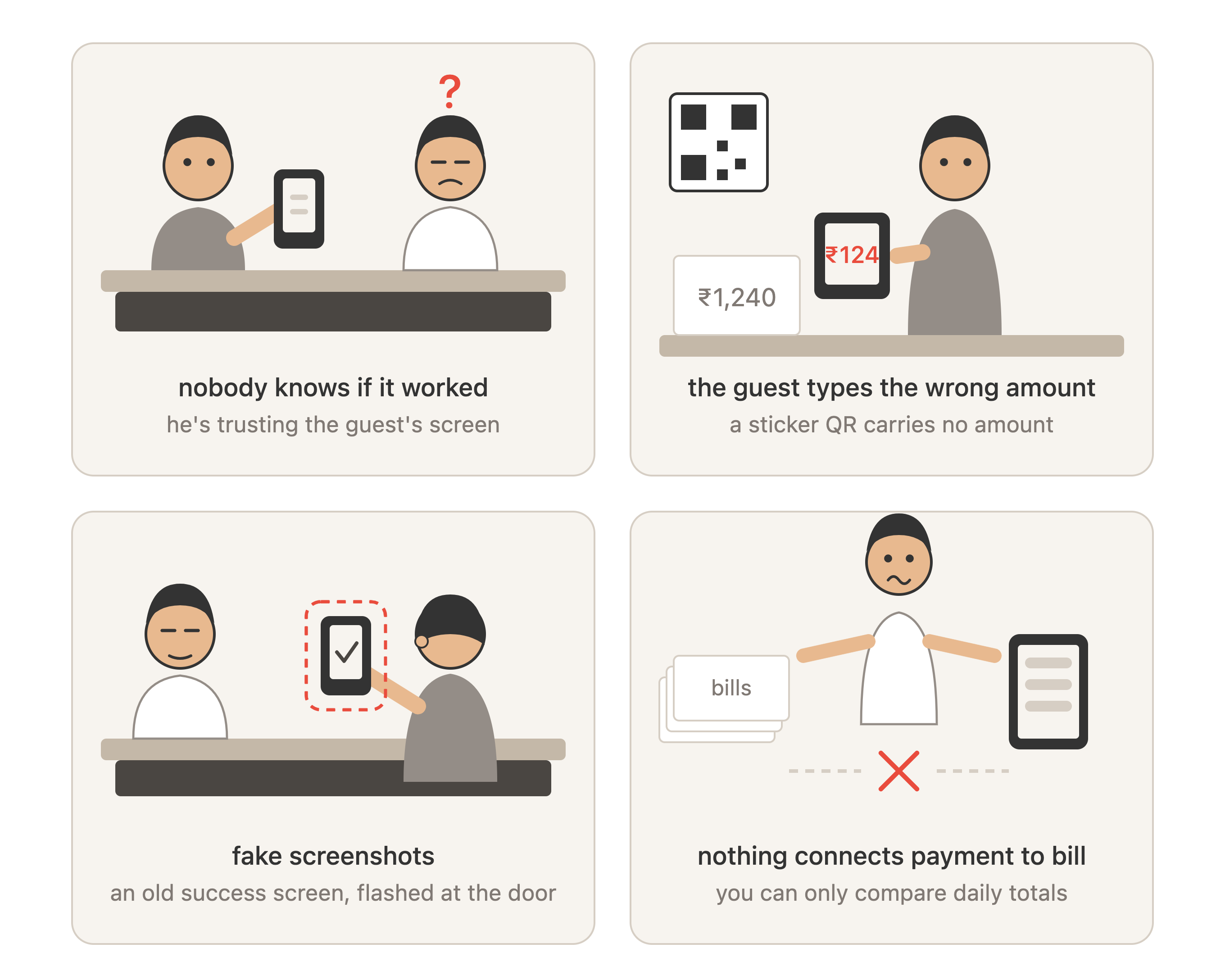
All four are fixed the same way: put the amount inside the QR code, and let the payment close the bill by itself.
Running on UPI alone with ChefDesk
Plenty of restaurants don't need a card machine at all. A café doing ₹6 lakh a month with 80% UPI shouldn't be paying rent on a machine that handles a fifth of its sales badly.
There are three ways to collect UPI in ChefDesk, all of them built on the same idea — the QR carries that bill's exact amount, and the payment closes the bill by itself:
- Printed on the bill. Each bill prints its own QR with the amount already inside it. Best for cafés, QSRs, bakeries and food courts.
- On a screen at the counter. A fresh QR per bill, no paper needed.
- On the captain's tablet. He closes the table at the table and never walks back to the counter — which saves four to six minutes per table, all of it at the end of the meal when you want the table back.
How each one works, which suits your restaurant, and what changed in the UPI rules in August 2026: [read the full guide to UPI payments].
Connecting ChefDesk to card machines
Card machines connect in one of three ways:
- By cable — wired to your billing computer. The most reliable. Keeps working when your internet doesn't. But it's stuck at one counter.
- Through the internet — the amount travels via the provider's servers to your machine, wherever it's standing. Goes to the table. Needs working internet at both ends.
- Over your local wi-fi or Bluetooth — wireless without the internet round-trip, but limited range.
Which one you want is decided by your format, not by the brand. Fixed counter, or patchy internet, means cable. Table service means wireless. Buying wireless for a counter that never moves just gives you a battery to charge.
ChefDesk works with the machines most Indian restaurants already have — Worldline, Paytm, Pine Labs and bank-supplied terminals, wired and wireless.
Which machine suits your restaurant, what each provider does well, and the questions to ask before signing: [read the full guide to payment device integration].
Availability depends on your bank and the exact machine model. Confirm before you commit.
Fourteen questions before you sign
On money
- What's the rate for each card type — normal credit, premium credit, corporate, foreign, debit, RuPay, meal card? Not one number.
- Rental, installation, yearly maintenance, deposit, and any charge for declined payments.
- Is that quote before or after GST?
- When does the money reach my account — next day or the day after? What about a Saturday sale?
- Am I locked in? For how long? What does leaving cost?
On the connection
- Is there a proper, documented connection for this exact machine model?
- Does it send the payment result back to ChefDesk, with the reference number and card type? Or only send the amount out?
- Can ChefDesk test it before we go live?
- How do tips work — do they come back to the billing software or not?
- Can refunds be started from the billing software, or only on the machine?
- Can I get the bank's daily settlement file automatically, so ChefDesk can check what actually reached my account?
On daily running
- What do my staff do when the connection fails in the middle of dinner service? Who is allowed to decide?
- How fast do you replace a dead machine? A dead machine on Saturday night is not a Monday problem.
- Who supports this — the bank, the machine company, or the software company? Name and phone number, please.
How to actually do it
Week 1: measure what you're losing now. Before you change anything, do the manual matching properly for 14 days and write down the daily difference. Don't skip this. Without it you'll never know what the change was worth, and in six months your partner will ask.
Week 2: decide if you even need card machines. If UPI is over 70% of your sales and your average bill is under ₹500, ChefDesk's QR may cover you completely. Test that before renting hardware. If credit cards are over 20% of sales, you need connected machines — the numbers above settle it.
Week 3: negotiate with your figures in hand. Walk in with your actual payment split and your current rate. Banks price against volume they can see. The owner who arrives with a printout gets a better rate than the one who asks what the rate is.
Week 4: try one counter first. One machine, one cashier, real service. Run the old manual matching alongside it for a week. Find the awkward cases — split bills, two cards on one table, part card and part cash, a tip added afterwards, a declined card tried again. Those are where connections break, and they all happen on a normal Friday.
Week 5 onwards: change the night-end routine. This is the step everyone skips, and it's the one that matters. If your manager still eyeballs two totals, you've bought nothing. The new routine is: read the exception list, fix every line, sign it. That's all.
Every month, forever: work out what the bank actually charged you as a percentage. Check that every payment reached your account. Look at any payment that has no bill attached — by name, not by total.
Eight questions to ask yourself tonight
- Can someone mark a bill "paid by card" without an actual card payment happening?
- Does the bank's reference number land on the bill by itself, or does a person type it?
- If your bank sends a dispute, can you find the bill in under a minute?
- Do your UPI payments each link to a specific bill, or just to a daily total?
- Does the QR on your printed bill already contain the amount?
- Does anyone work out your real bank charges each month? Can they show you last month's?
- At night-end, does your manager read a list of problems, or compare two totals?
- If the connection breaks mid-service, do your staff know what to do without phoning you?
Checking a machine's work by hand is cheap and reliable.
Doing the machine's work by hand is expensive and it breaks.
All figures correct as of 24 August 2026 and subject to change. Debit card limits are set by RBI. The UPI position reflects the law signed on 17 August 2026, under which no charge has yet been introduced. Credit card and meal card rates are negotiated individually. Check with your bank.