Which restaurant tech setup is right for you?
From a single Android POS at a kiosk to a full LAN + WiFi kitchen with captain OTMs and Kitchen Display Systems — ChefDesk fits every scale. Use this guide to pick the right hardware, ordering method and KOT flow for your restaurant, based on format and budget.
Match your restaurant to the right setup
Every restaurant format has a natural fit. Use this table to jump straight to the setup that matches your scale.
| Business type | Recommended setup | Order taking | KOT method | Jump to |
|---|---|---|---|---|
| Kiosk / Small cafe / Take-away | Single Terminal POS | Counter POS or handheld | Thermal printer at counter | Details |
| QSR — Pizza, Burger, Chaat | Multi Touch POS Terminals | Multiple counter POS + Scan & Order | KOT printer or Kitchen Display | Details |
| Cloud kitchen / Dark store | Smart Phone / Tablet POS | Tablet + aggregator integrations | Kitchen Display System (KDS) | Details |
| Fine dine / Casual dine | LAN + WiFi (POS + Captain OTM) | Captain mobile OTM + cashier POS | KDS + section-wise KOT printers | Details |
| Large multi-floor / Banquet | LAN Multi-Terminal + local server | Multi POS + Captain OTM | Multi-station KDS + KOT printers | Details |
The 5 ChefDesk setups explained
Tap a card to jump to a detailed breakdown — what it's best for, what hardware you need and what the order & KOT flow looks like.
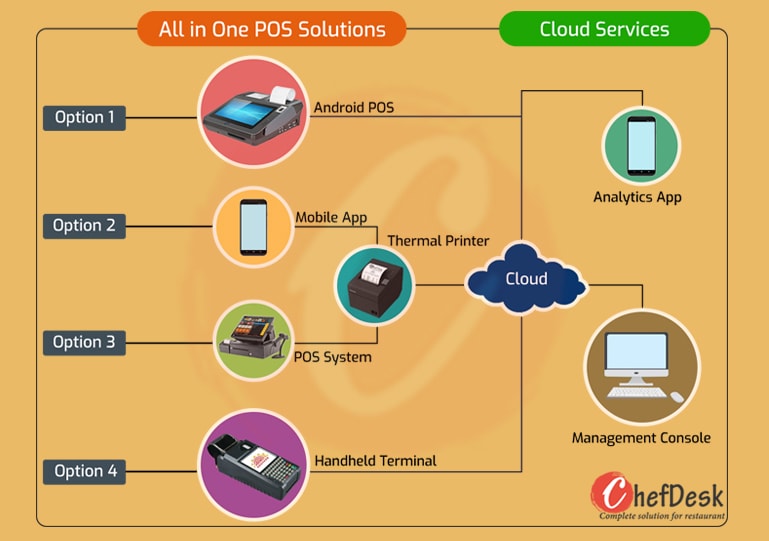
Perfect for small cafes and kiosks. One device, low investment, fastest to install.
Single Terminal POS
For QSR chains that need multiple independent counters — no local server required.
Multi Touch POS Terminals
Zero LAN cabling. Ideal for cloud kitchens, small dine-ins and pop-ups on WiFi.
Smart Phone / Tablet POS
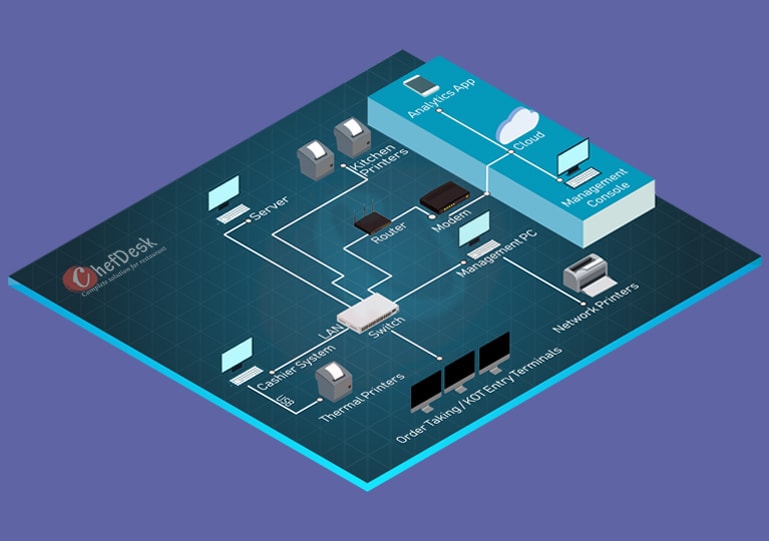
Robust LAN + local server for large restaurants demanding maximum reliability.
LAN Connected Multi Terminals
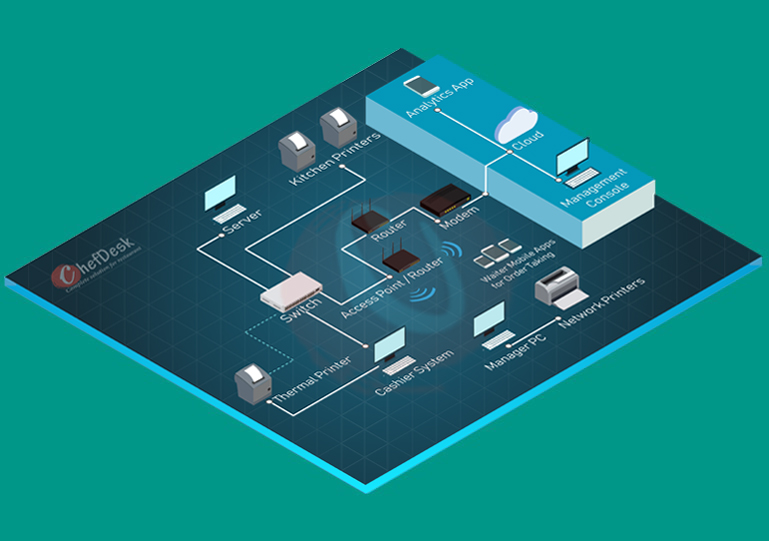
Best of both worlds: cashier POS terminals plus captain mobile order-taking.
LAN + WiFi Connected POS
Single Terminal POS — best for kiosks & small cafes
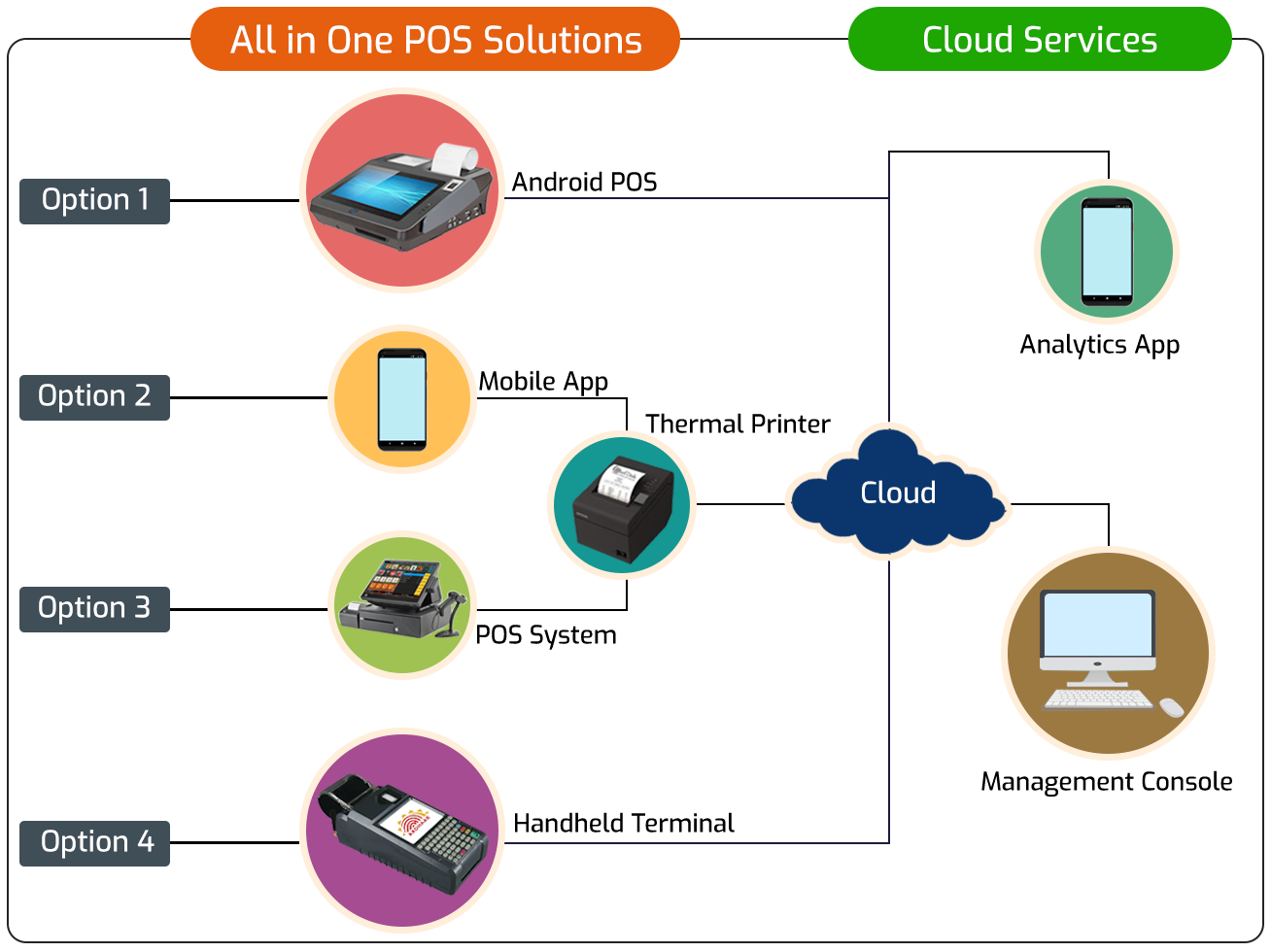
One device. Low investment. Live in a day.
A single POS device runs billing, KOT printing and cloud sync — no network, no server, nothing to maintain. Perfect for a cafe, small QSR, sweet shop or take-away counter.
- All-in-one Android POS with built-in printer & card reader
- Runs on any Windows laptop, desktop or Essae / Posiflex touch POS
- Works offline — bills queue locally and sync to cloud on reconnect
- Handheld POS with GPRS SIM available for very small kiosks
Multi Touch POS Terminals — best for QSR chains
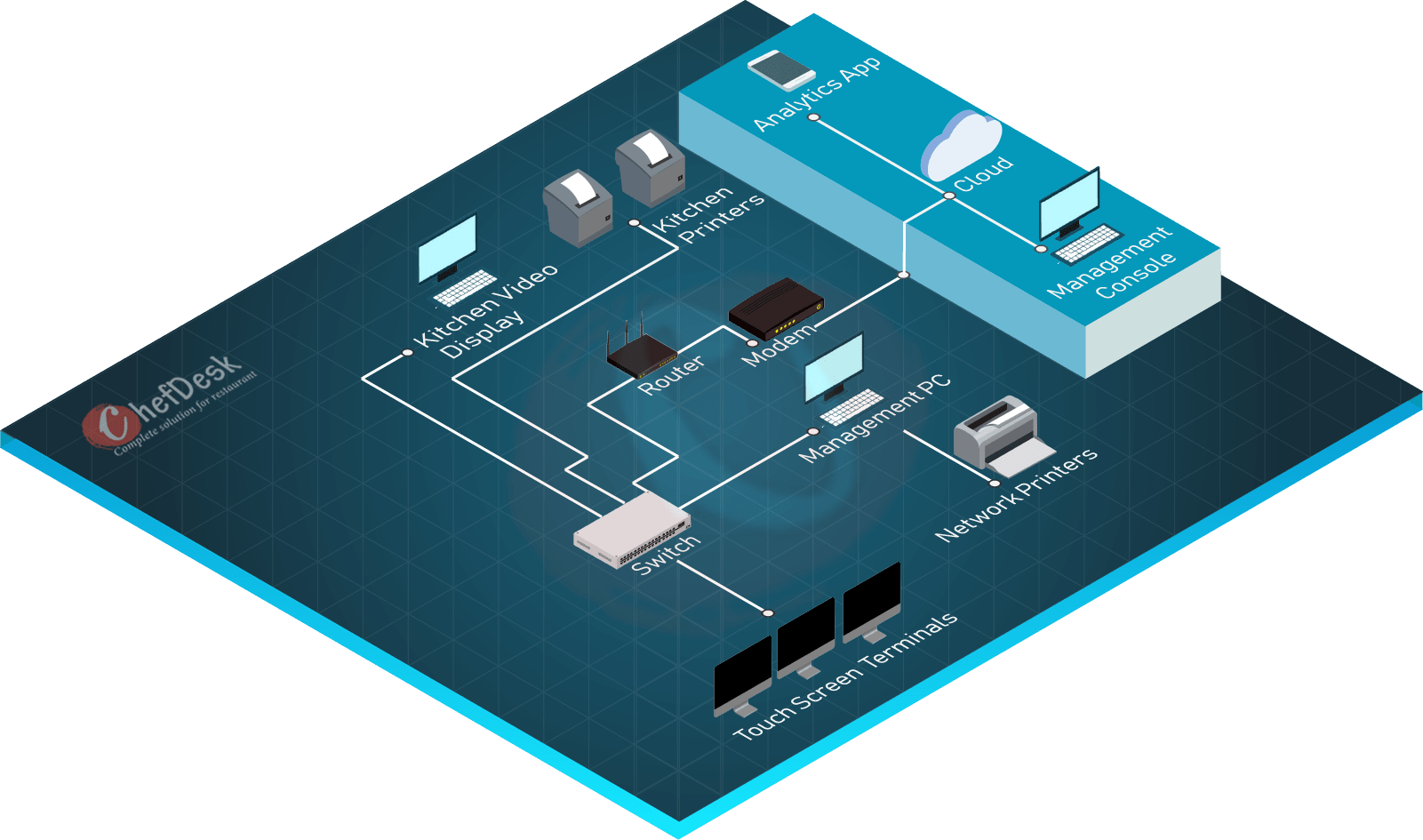
Multiple counters. No local server. No queues.
Every POS terminal is independent and syncs directly to the cloud. Kill long billing queues at peak hours, add a counter in minutes, and never lose a sale to a server crash — because there is no server.
- Zero investment in server hardware or OS licenses
- No single point of failure — one POS down, others keep billing
- Data lands in the cloud in real time for consolidated reporting
- Add Scan & Order and Kiosk to divert traffic from the counter
Smart Phone / Tablet POS — best for cloud kitchens & small dine-ins
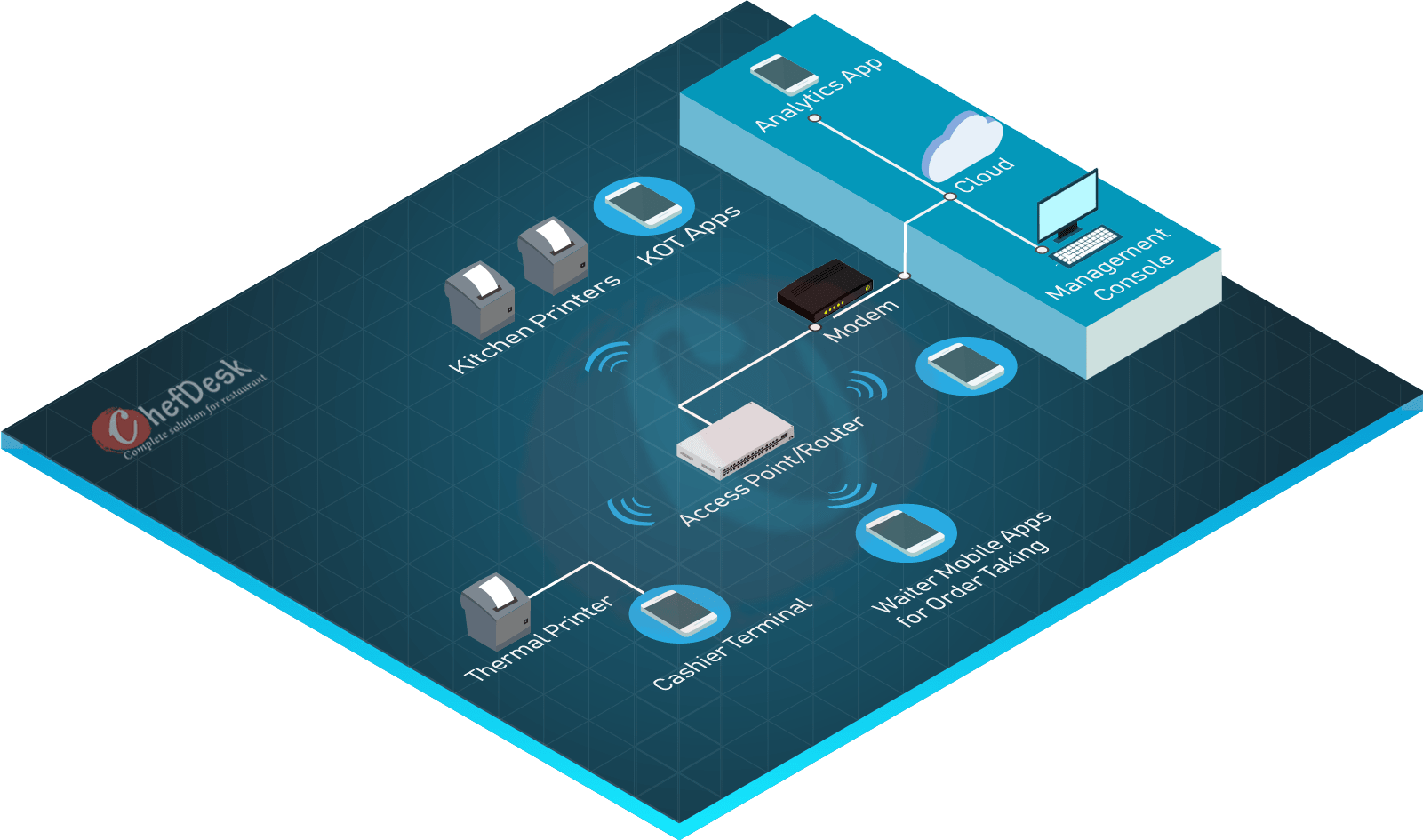
Skip the LAN cables. Run everything on phones and tablets.
ChefDesk's Android app turns any phone or tablet into a POS. No cabling, no local server — just WiFi (or a GPRS SIM). Great for cloud kitchens, dark stores, food trucks and small dine-ins where running LAN is impractical.
- WiFi access points cover the entire floor — add captains anytime
- GPRS/SIM fallback for locations without stable WiFi
- Real-time cloud sync across every phone, tablet and printer
- Lowest capex — no server, no LAN cabling, no dedicated POS hardware
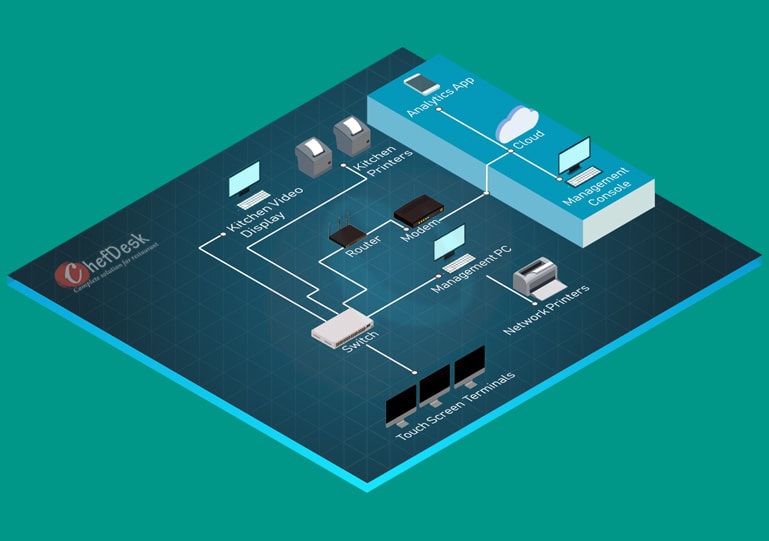
LAN Multi-Terminal + local server — best for large restaurants
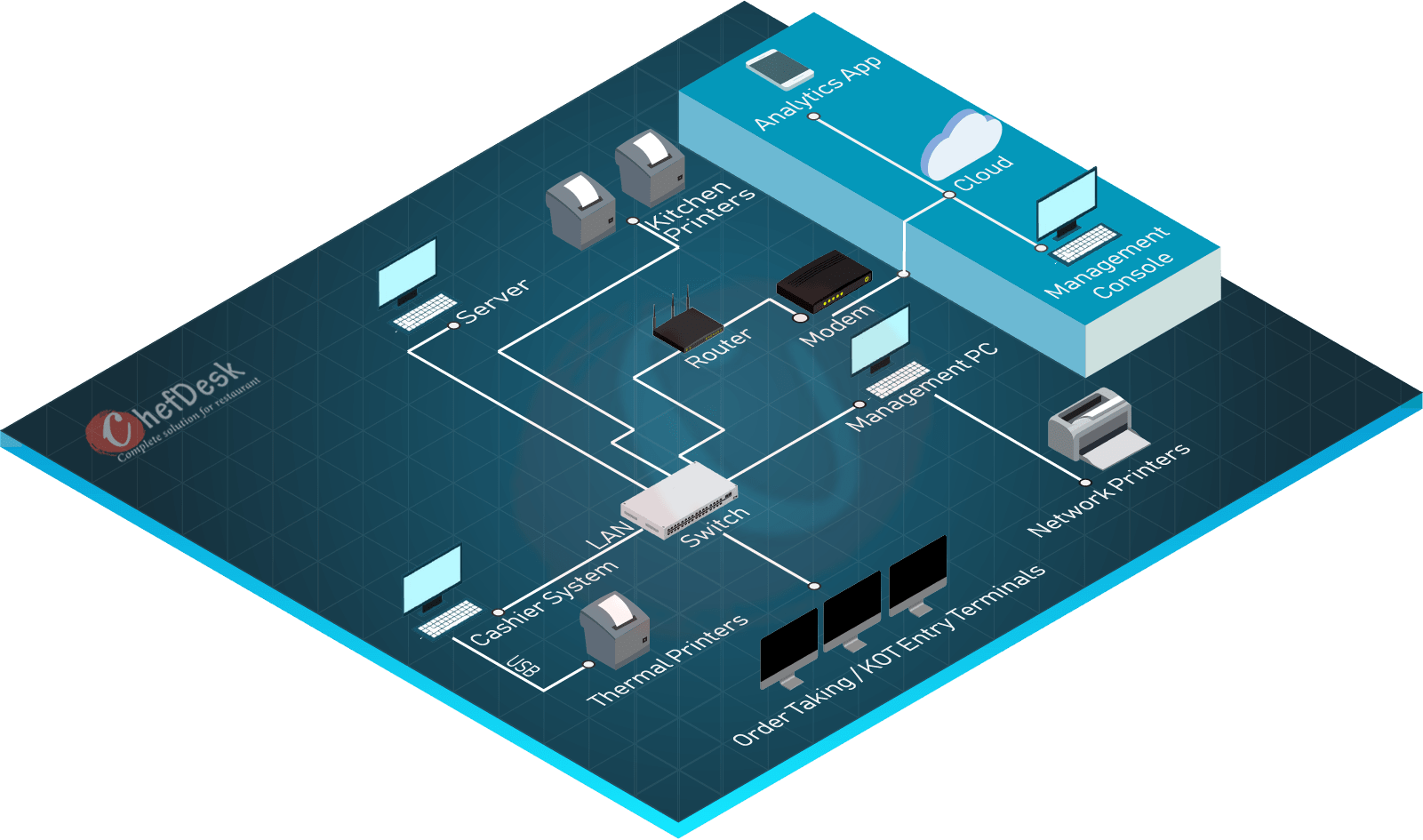
Fort-knox reliability for high-volume operations.
A hardened LAN with a local server keeps every POS, KOT printer, KDS and captain device in sync — even if the internet drops. Purpose-built for banquets, multi-floor casual dining and any operation where downtime is not an option.
- Enterprise-grade POS hardware (solid-state, passive cooling) built to last
- Central firewall & anti-virus — maximum data security
- Local server + cloud: operations never stop, reports always fresh
- Integrates KOT printers, KDS, EDC machines and delivery aggregators
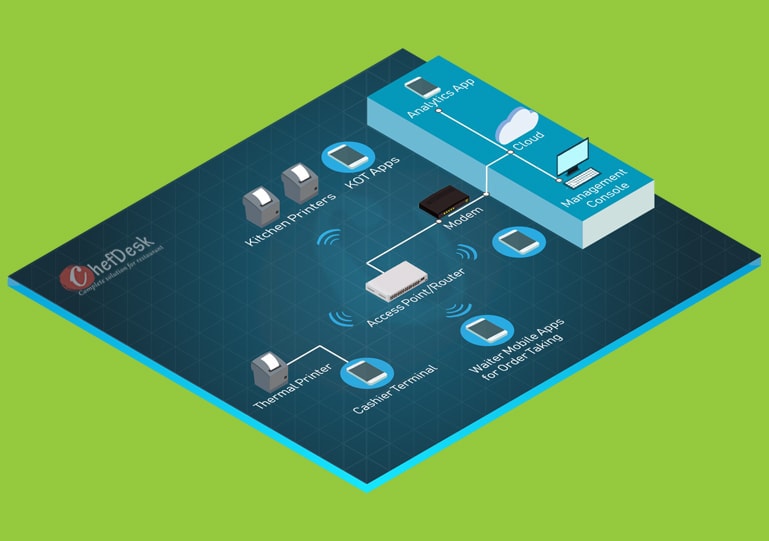
LAN + WiFi (POS + Captain OTM) — best for fine dine & casual dine
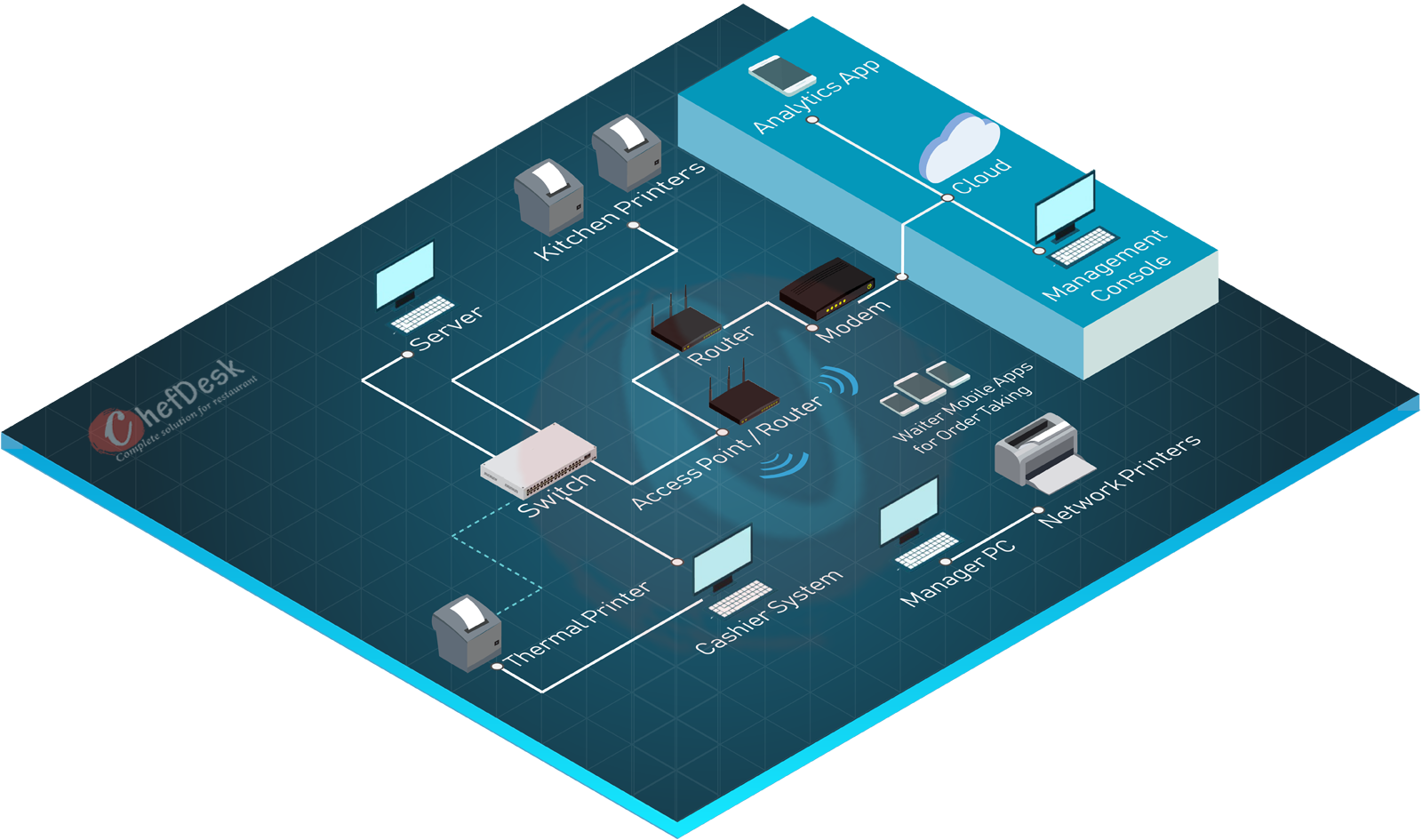
Cashier POS at the counter. Captains at the table.
A local server hosts data for every cashier POS, KDS and KOT printer over LAN, while captains take orders at the table on ChefDesk OTM app over WiFi. Faster service, fewer errors and better table-turn times.
- Captain OTM cuts order-to-kitchen time from minutes to seconds
- Operations continue even if internet drops — server is on LAN
- Unlimited terminals: POS, printers, KDS, EDC, aggregator gateways
- Cloud sync keeps owner dashboards and multi-outlet reports live
Order-taking methods — pick one or combine them
Every ChefDesk setup supports every ordering method. Mix and match to serve customers the way they want to be served.
Counter POS
Traditional cashier terminal — fastest for high-volume QSR and take-away.
Captain OTM (mobile)
Waiters take orders at the table on a phone or tablet. Cuts errors and boosts table-turn time.
Self-order Kiosk
Guests order themselves at a touch screen — great for QSR, food courts and cinemas.
QR Scan & Order
Diners scan a QR at the table, browse the menu and order without downloading an app.
WhatsApp ordering
Take orders on the world's most used chat app. Confirmations and updates go back on WhatsApp.
KOT printer vs Kitchen Display System (KDS)
The kitchen is where speed is made or lost. Here's how paper KOTs compare with a digital KDS — so you can pick what your kitchen actually needs.
| KOT Printer | Kitchen Display (KDS) | |
|---|---|---|
| Upfront cost | Low — ₹4k–8k per printer | Higher — screen + mount per station |
| Order speed | Chef reads paper — good for small kitchens | Instant, colour-coded, no reprint delays |
| Error rate | Depends on handwriting-style tickets | Very low — modifiers & allergens highlighted |
| Multi-station routing | One printer per station | Automatic routing by dish type |
| Tracking & recall | Paper trail only | Live status, prep time analytics, bump history |
| Best for | Small cafes, QSR with 1–2 KOT stations | Fine dine, cloud kitchens, multi-section kitchens |
Connectivity & reliability
Cloud sync
Every sale, KOT and payment lands in the ChefDesk cloud in near real-time. Multi-outlet dashboards, reports and menu changes push down instantly.
Offline mode
Internet down? Billing continues locally on POS terminals or via the local server. Data syncs automatically when the connection returns.
LAN vs WiFi
LAN for large, uptime-critical setups. WiFi + tablets for lightweight cloud kitchens and small dine-ins. LAN + WiFi combines both for premium formats.
Pair your setup with the right software
Hardware gets orders in — ChefDesk software runs the rest of your restaurant. Explore the modules that plug into every setup above.
Find your format
Every format bills differently. These pages cover the workflow, pricing and hardware specifics for each one.
Frequently asked questions
Ready to Transform Your Restaurant?
Join thousands of successful restaurants. Book a demo today and see ChefDesk in action
No credit card required • 30-day free trial