
Switching Restaurant Billing Software Without Losing Data
Switching billing software is easy. Getting six years of history out of the old system before the account goes dark is the part nobody plans for.

Switching billing software is not technically hard. Most restaurants could be running on a new system inside a fortnight. What goes wrong is the part nobody plans for: getting six years of history out of the old one before the account goes dark.
Most owners discover what their contract actually says at the worst possible moment — the day they decide to leave.
The conversation goes roughly the same way every time. The owner asks for his data. The vendor offers to help "if you tell us what reports you need." The owner realises he does not know what he needs. Someone mentions that the account will be deactivated at the end of the billing cycle. And somewhere in that week, three years of bill-level history — the only complete record of what the business actually sold — quietly becomes inaccessible.
This is not usually malice. Most POS vendors are not deliberately holding data hostage. It is simply that nobody builds a good exit door, because nobody is rewarded for it.
Two things make this worse than an inconvenience. First, you are legally required to keep that data, and the obligation sits on you, not on your vendor. Second, from May 2027, the customer database in your POS carries statutory liability with your name on it.
Here is how to move to a new system without losing anything, and how to make sure the next contract does not leave you in the same position.
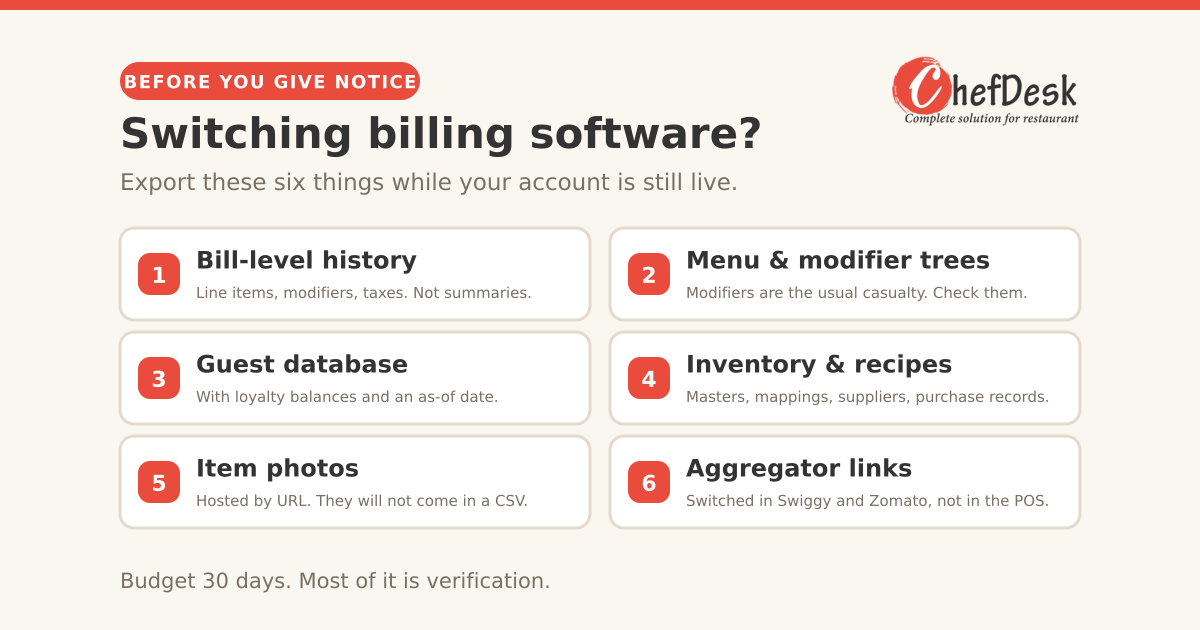
Budget thirty days. Not because the software takes that long — the new system can be configured in a week — but because most of the time goes on exporting and then verifying what you exported. The verification is the part that saves you, and it is the part everyone skips.
1. The legal floor: what you must keep, regardless of who your vendor is
GST: six years, and it is your problem. Section 36 of the CGST Act, 2017 requires every registered person to retain books of account and related records for 72 months from the due date of furnishing the annual return for that year. Since GSTR-9 is generally due on 31 December of the following financial year, the practical retention period stretches past seven years from the end of the financial year itself.
Work an example. For FY 2023-24, the annual return was due 31 December 2024. You must hold those records until 31 December 2030.
And if you are party to an appeal, revision, or investigation, the proviso extends this to one year after final disposal, or the standard period, whichever is later.
The GST officer conducting an audit in 2029 will not be interested in the fact that you switched POS vendors in 2026 and the old one deactivated your account. The obligation was always yours.
DPDP: from May 2027, the guest data is your liability. The Digital Personal Data Protection Rules, 2025 were notified on 13 November 2025, and the regime is phasing in — the Data Protection Board is already operational, the Consent Manager framework arrives 13 November 2026, and substantive compliance obligations land on 13 May 2027.
Here is what most restaurant owners have not registered. Every guest phone number, name, birthday and order history your POS holds is personal data. In DPDP terms, your restaurant is the Data Fiduciary and your POS vendor is a Data Processor. The Fiduciary is the one who determines the purpose of the processing, and the Fiduciary carries the obligations — notice, consent, breach response, and honouring data principal rights.
Penalties under the framework scale to ₹250 crore for failure to maintain reasonable security safeguards and ₹200 crore for failure to notify a breach. Those ceilings are aimed at large platforms, and no one expects a fifty-cover restaurant to be fined at that scale. But the obligation applies to any organisation processing personal data of individuals in India, regardless of size.
The practical consequence for you: if a guest exercises their rights and asks what data you hold on them, "my software company has it and I cannot get to it" is not an answer. You need to be able to reach your own guest data, and you need a written arrangement with the vendor who is processing it on your behalf.
2. What "my data" actually means
Before you can export it, you need to know what it consists of. Owners routinely ask for "my data" and receive a sales summary, which is roughly 2% of it.
Transactional records, the part with legal weight: bill-level data with line items, modifiers, quantities, unit prices, discounts, taxes by slab, service charge, tender type, timestamps, table and covers, and the staff member who raised it. Void and cancelled bills with reasons. NC bills and complimentary items. Refunds. Day-end summaries and cash reconciliation.
Menu and configuration: items, categories, variants, modifier groups and their rules, pricing tiers, tax mapping per item, kitchen routing rules, printer configuration, item photos.
Guest data: names, phone numbers, addresses, birthdays and anniversaries, order history, loyalty point balances, feedback, marketing opt-in status.
Inventory and recipe data: raw material masters, units and conversions, recipe mappings and yields, supplier records, purchase orders, GRNs, stock counts, wastage logs.
Staff data: user accounts, permission configurations, attendance, shift records, payroll inputs.
Integration state: aggregator outlet IDs and menu mappings, payment gateway configuration, third-party connections.
The item that matters most and gets exported least often is bill-level transactional history with line items. A sales summary tells you that Tuesday did ₹86,000. It does not let you reconstruct a GST return, defend an audit, or analyse anything. Summaries are not records.
3. Do this now, even if you are not leaving
The single most valuable habit in this entire article, and it takes twenty minutes a month.
Export monthly and store it yourself. On the first of every month, download last month's bill-level report, the day-end summaries, and the current menu configuration. Put them in a dated folder in Google Drive or on a drive you control. Once a quarter, add the guest database and the inventory masters.
Do this from your first day on any POS, and the exit conversation stops being a negotiation. You already have your history. All you need from the vendor at exit is the current configuration and whatever sits since your last export.
It also protects you against the less dramatic failure modes: the vendor's outage, the account suspended over a billing dispute, the vendor who is acquired and sunsets the product, the vendor who simply goes out of business.
Verify your export at least once. Open the file. Count the rows against a day you remember. Check that modifiers and taxes are present, not just totals. An export you have never opened is not a backup.
4. Exporting from Petpooja
Petpooja is the most common starting point for Indian restaurants, so let us be specific — and fair. Their CRM documentation states you can download customer data as often as you want, at no cost, and their reporting module produces downloadable reports across sales, item-wise consumption, payment type and order type, with exports available from the web dashboard. That is a better position than several vendors.
Based on what migration guides and their published material describe, the routes are roughly these:
Menu — Admin panel, Menu section, the three-dot menu, Export as CSV. This carries items, categories, prices and tax slabs. Modifier trees are the known weak point and often need a support ticket to get out cleanly. Budget time for this; a mis-mapped modifier tree is how a restaurant ends up charging wrong for paneer upgrades for a month.
Reports and sales history — the reports module, with downloadable and customisable formats. Pull bill-level detail rather than summaries. Go month by month if the interface limits date ranges.
Customer and CRM data — exportable from the web dashboard, free and unlimited per their own documentation.
Loyalty balances — export as a ledger with an as-of date, because you will need to reconcile these after migration. Expect a small delta and plan to correct it.
Item photos — these are hosted on cloud storage and referenced by URL. They do not come down in a CSV. Either re-upload them to the new system or pull them from the hosted URLs while you still have access.
Aggregator connections — this is not a Petpooja export at all. You change the POS integration inside the Swiggy and Zomato partner dashboards separately. Menu sync typically takes 24 to 48 hours. Your ratings, reviews and outlet IDs are held by the aggregator and are unaffected by the POS change.
A caution: the exact menu paths above come from third-party migration documentation rather than Petpooja's own help centre, and interfaces change. Treat them as a map, not a manual, and confirm in your own admin panel.
For any other POS, the same logic applies: find the reports module, export at the most granular level offered, look for a separate CRM or customer export, treat menu configuration as a separate job, and assume photos and integration state will not come out in a file.
5. When there is no export button
Some systems, particularly older on-premise ones, simply do not offer usable exports.
Ask in writing. An email creates a record and tends to produce a different response from a phone call. Reference your contract's data provisions if it has any, and note that you have statutory retention obligations under Section 36 of the CGST Act. For guest data specifically, you can reasonably note your position as Data Fiduciary under the DPDP framework.
Ask for the database, not a report. If the system runs on a local machine, the underlying database file may be accessible. This is your data on your hardware. A competent local IT person can extract from it.
Use screen-level reports as a fallback. Tedious, but a month of PDFs downloaded one at a time is better than nothing when a deadline is approaching.
Ask about an API. Some vendors offer one on request even where it is not advertised.
Escalate before you cancel. Your leverage is highest while you are still a paying customer. Get the export completed and verified before you give notice — not after.
6. Before you sign the next one: diligence
Ask for a test export during the trial. Not a promise that export exists. An actual file, from actual demo data, that you open and inspect. This is the single most informative thing you can do, and almost nobody does it.
Read the auto-renewal and notice terms first. Many annual contracts renew automatically unless cancelled 30, 60 or 90 days before the renewal date. Miss the window and you have bought another year. Put the notice deadline in your calendar the day you sign.
Check whether hardware keeps working. If the vendor sells or leases you a terminal, ask explicitly what happens to that device if you stop subscribing. Get the answer in writing.
Find out where the data is hosted. India or elsewhere. This matters for DPDP purposes and for how quickly you can get access in a dispute.
Ask what they do with your data. Some vendors reserve rights to use aggregated customer data, or to market to your guests. This should be an explicit clause, not an assumption.
Check the support reality, not the support promise. Ask for the SLA in writing. Ask what happens at 9pm on a Saturday when billing goes down. Then call the support number during dinner service, before you sign, and see who answers.
7. Questions to ask the vendor
Send these in writing and keep the replies. The answers tell you more than the demo does.
| Ask | A good answer sounds like | A bad answer sounds like |
|---|---|---|
| Can I export my full bill-level transaction history myself, any time, without raising a ticket? | Yes, self-serve from the dashboard, with line items and modifiers | "Our team will generate it for you" |
| What exactly is in the export — line items and modifiers, or totals? | Item-level with modifiers, taxes and tender type | Vagueness, or a sales summary shown as proof |
| Is there a documented API, and is it included? | Yes, documented, included in the plan | "Available on the enterprise plan" |
| What happens to my data the day after I stop paying? At 30 days? At 180? | A stated retention window with read access | "You'd need to speak to your account manager" |
| On exit, will you provide a full machine-readable dump? In what timeframe, at what cost? | Yes, within a defined number of days, free or at a stated fee | Silence, or "we've never had anyone ask" |
| Where is my data hosted? | Named region, India | Unclear |
| Will you sign a Data Processing Agreement covering DPDP obligations? | Yes, here is our standard one | "We're compliant" with no document |
| Who owns the guest database? Can you market to my customers or resell aggregated data? | You own it; we do neither | Anything conditional |
| If I stop subscribing, does hardware I bought from you keep working? | Yes | "The software licence is tied to the device" |
| What is the support SLA, and what is the remedy if you miss it? | Defined response times with service credits | "We're very responsive" |
| What is the maximum price increase on renewal? | A capped percentage in the contract | "We rarely increase prices" |
| Can I have a sample export from demo data before I sign? | Here it is | Reluctance |
That last one is the tell. A vendor confident in their export will send the file. A vendor who deflects is telling you something about the exit you will eventually have.
8. What to look for in the agreement
Data ownership. An explicit clause stating the customer owns all data entered into or generated by the system. If the contract is silent on ownership, fix that before signing.
Exit and transition assistance. The clause that matters most and appears least. It should commit the vendor to providing a complete export in a machine-readable format, within a defined number of days of request, at no cost or a stated cost, and — critically — including after termination. Many contracts promise export "during the term," which is useless precisely when you need it.
Post-termination retention and deletion. How long they keep your data after you leave, and confirmation that they delete it on request. You want both: a window long enough to retrieve anything you missed, and certainty that it does not live on their servers indefinitely.
Data processing terms. With DPDP substantive obligations landing in May 2027, a written processing agreement should cover purpose limitation, security safeguards, sub-processors, breach notification timelines, and assistance with data principal requests. Note that the framework requires affected individuals to be notified of a breach within 72 hours — you cannot meet that if your vendor tells you a month later.
Restrictions on vendor use of your data. No marketing to your guests. No resale of identifiable data. If they aggregate for benchmarking, it should be disclosed and anonymised.
Hardware independence. If you bought the device, it remains functional and yours.
Service levels with actual remedies. Uptime commitment, response times by severity, and service credits. An SLA with no remedy is a sentence, not a commitment.
Price escalation cap. A stated maximum increase on renewal. Without it, your switching cost becomes the vendor's pricing strategy.
Termination for convenience. Whether you can leave mid-term, with what notice, and what happens to prepaid amounts.
Assignment. What happens if the vendor is acquired. Consolidation in this sector is real, and the acquirer inherits your contract but not necessarily the relationship you had.
Governing law and jurisdiction. Usually the vendor's home city. Worth knowing before a dispute, not during one.
How do I switch my restaurant billing software?
Export your complete bill-level history, guest database, menu and modifier configuration, and loyalty balances from the old system while your account is still active and paid up, then verify every file before you give notice. Configure and test the new system in parallel, switch your Swiggy and Zomato integrations in their own partner dashboards, and keep the old subscription running for one extra billing cycle as insurance.
Here is that sequence as a working plan.
9. A thirty-day exit runbook
Days 1–5. Export everything while your account is fully active and you are still a paying customer in good standing. Bill-level history for the entire relationship, guest database, menu and modifiers, inventory masters, loyalty balances with an as-of date. Store it somewhere you control.
Days 6–10. Verify. Open every file. Check row counts against days you remember. Confirm modifiers, tax slabs and tender types are present. Go back and re-pull anything incomplete — you still have access.
Days 11–20. Configure the new system. Import menu, fix modifier trees by hand, import guests, set tax mapping, configure printers and kitchen routing. Do not rush the tax mapping.
Days 21–25. Run both systems in parallel for a few days if you can, or at minimum run the new one through a full service on a quiet day. Reconcile a day's sales between old and new.
Day 26. Switch the aggregator integrations in the Swiggy and Zomato partner dashboards. Allow 24 to 48 hours for menu sync. Run test orders before going live.
Days 27–30. Cut over. Keep the old account active for at least one more billing cycle as insurance — the cost of one extra month is trivial against discovering a gap after access ends.
After. Request written confirmation of what the old vendor retains and for how long, and ask for deletion once you are confident you have everything.
The short version
Your data is a compliance obligation before it is an asset. GST requires you to hold it for six years past the annual return deadline. From May 2027, the guest database in your POS carries statutory duties that belong to you, not your software vendor.
Export monthly, starting today, whatever system you are on. Ask for a test export before you sign anything. And read the exit clause before the pricing page, because the exit clause is the one that decides whether your next switching decision is a business decision or a hostage negotiation.
At ChefDesk we do not sell hardware and we do not lock data. But the right test is not what we say — it is whether any vendor, including us, will hand you a sample export when you ask. Ask us. Ask them.
This article is general information, not legal or tax advice. Retention obligations and data protection duties vary with your circumstances. Consult your chartered accountant and a lawyer before relying on anything here for a specific decision. Statutory positions described are current as of September 2026.