
Who Really Owns Your Restaurant's Facebook and Instagram?
You find out who owns your accounts on the day you try to leave, which is exactly when your leverage is lowest. Here is how to check first.

A restaurant owner rings his marketing agency to say the arrangement isn't working out. The call is civil. Then he tries to log into his own Instagram and discovers he cannot. The website is fine, until the domain expires four months later and nobody renews it. The Google listing with two hundred reviews — nine years of reputation — is controlled by a Gmail address he has never seen.
He did not sell any of this. He never even discussed it. It happened because somebody had to create the accounts to get the work started, and the person creating them used their own login.
This is the most common unforced error in restaurant marketing, and it is close to invisible while the relationship is good. You only find out when you want to leave, which is exactly when your leverage is lowest.
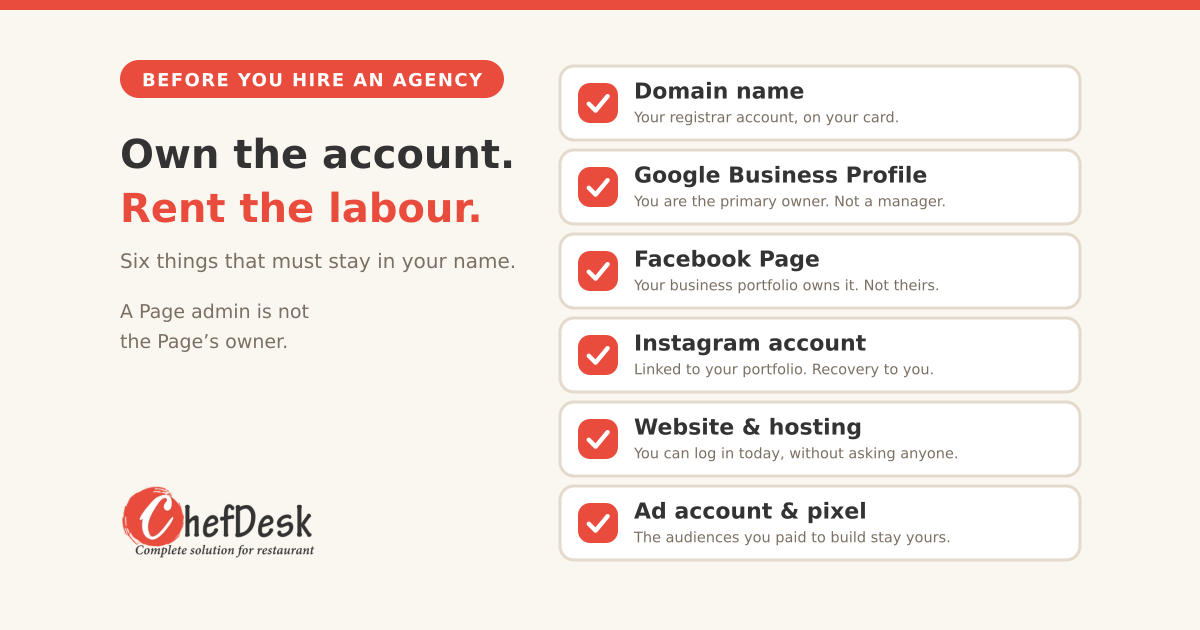
The principle that prevents all of it fits in five words: own the account, rent the labour.
1. Ownership and access are not the same thing
Every platform in this list distinguishes between the entity that owns an asset and the people who can work on it. Agencies need the second. They should never have the first.
A good agency will already work this way and will not blink when you ask. An agency that resists — that tells you it is "easier if we set it up on our side," or that their process requires their own business account — is telling you something about how the relationship ends. That is worth knowing on day one rather than year three.
None of what follows requires technical skill. It requires knowing which button says "owner" and making sure it has your name next to it.
2. The asset register
Before anything else, write down what exists. Most owners have never listed these in one place, and you cannot protect what you have not named.
| Asset | Who must own it | Who can have access |
|---|---|---|
| Domain name | You, in your own registrar account | Agency, via delegated access or DNS-only |
| Website hosting | You | Agency, as a user |
| Website files and CMS | You | Agency admin login |
| Google Business Profile | You, as primary owner | Agency, as manager |
| Facebook Page | Your Meta business portfolio | Agency, as a partner |
| Instagram account | You, linked to your portfolio | Agency, as a user |
| Google Ads account | You | Agency, via manager account link |
| Meta ad account, pixel, audiences | Your portfolio | Agency, as partner |
| Google Analytics, Search Console | You | Agency, as user |
| Email list / WhatsApp Business | You | Agency, as user |
| Photos, logo source files, video | You, with written assignment | Agency, working copies |
| Zomato / Swiggy merchant logins | You | Agency, if genuinely needed |
Notice the pattern. Every single row has the same owner.
3. The domain: the one that can actually kill you
This is the most dangerous asset on the list, because losing it takes down your website and, in many setups, your email at the same time.
Register it yourself, in your own account, on your own card. Not the agency's account with your name in a field somewhere. Your account, your login, your billing. A .com costs under a thousand rupees a year. There is no scenario where it is worth outsourcing that.
Put your legal entity in the Organization field. Since August 2025, where the Organization field contains a company name, that organisation is recognised as the legal owner of the domain, and individual names in the contact fields are treated as contact persons only. Put the entity that owns the restaurant there, not your manager's name and not the agency's.
Understand the 60-day locks before you need to move fast. There are three separate 60-day transfer locks under ICANN's policy: one after a new registration, one after a transfer between registrars, and one after a change of registrant details. Only the change-of-registrant lock can be opted out of, and — critically — you must opt out before making the change, not after. If an agency updates the registrant details and does not opt out, your domain is frozen for two months at the exact moment you are trying to take it back.
A reform accepted by ICANN's GNSO Council in March 2025 will remove the registrant lock and shorten the others to 30 days, but implementation takes time and the 60-day rule is what registrars enforce today. Check your registrar before assuming.
A note for .in domains: country-code registries run their own rules rather than ICANN's, so the windows differ. Read your registrar's terms rather than assuming.
Turn on auto-renew and put the expiry in your own calendar. Expired domains get bought within hours by people who know what a restaurant with traffic is worth.
Keep the registrar account email on a mailbox you control. Not the agency's address, and not a personal Gmail belonging to a manager who might leave.
4. Google Business Profile: the reviews are the business
For a restaurant, this is arguably the most valuable single asset, because it is where nine years of reviews live and where most of your walk-in discovery happens.
You must be the primary owner. Not an owner. Not a manager. The primary owner is the only role that can transfer ownership or remove other users. Agencies should be added as managers, which lets them post, respond to reviews and update information, while leaving control with you.
Know how the timing works, because it protects you and it also slows you down. Google applies a seven-day restriction window when a new owner is added, during which certain sensitive actions are limited. That is a security feature, and it means a handover needs planning rather than being done in an afternoon.
If someone else already holds it, you can request access through the listing. The current owner gets a notification and a few days to approve, deny or ignore it. If they ignore it, you escalate to a verification process — and as of 2026, video verification of the premises has become common for disputed cases. Being physically present at a real restaurant is a strong position to argue from, which is why this is usually recoverable.
Do not create a second listing. It is the instinctive reaction and it is the wrong one. You end up with a duplicate carrying no reviews, competing against your own real listing, and a mess that is harder to fix than the original problem.
5. Facebook and Instagram: where it gets genuinely ugly
Meta is the hardest of these to unwind, so it is the one most worth setting up correctly.
The trap: when a Page is added to a business portfolio, that portfolio owns the Page. If your agency added your Page to their portfolio, your Page belongs to their business, not yours. Being an admin of the Page is not the same thing and does not save you.
How it should be set up. Create your own business portfolio in Meta Business Suite, under your own personal Facebook profile as admin. Add your Page and your Instagram account to your portfolio. Then add the agency as a partner with assigned access to specific assets. Partner access is exactly the mechanism Meta built for this. When the relationship ends, you revoke the partner and everything stays where it is.
Add a second admin from your own side — a co-founder, a family member, your general manager. Single-admin portfolios are how businesses get locked out when one person leaves or loses their account.
If the agency already owns it, the only clean route is asking them to remove the Page from their portfolio so you can add it to yours. Ask politely, in writing, while the relationship is still cordial.
If they will not, or cannot be reached, you can file a Page release request with Meta. Be realistic about this: the person filing must be part of the organisation and an admin of the Page, Meta will not accept requests from consultants or agency staff, and the information you submit has to be externally verifiable. Reported timelines run from around two weeks to well over six months.
Instagram adds its own complication. A linked Instagram account can block a Page ownership transfer outright. In some cases the account has to be unlinked — occasionally converted temporarily to a personal account — before the claim will go through. Budget patience.
That timeline is the entire argument for spending twenty minutes on this before you hire anyone.
6. Creative work: get the assignment in writing
Photography, logo files, website design, video. Most owners assume that paying for creative work means owning it. Under Indian copyright law that assumption is only sometimes correct.
For commissioned photographs there is a statutory position that favours the person who commissioned the work. For most other categories, the author is the first owner unless there is a written assignment. An assignment has to be in writing and signed. And there are traps in the default terms: where an assignment does not specify a duration, it can be deemed to run for five years rather than forever, and an assignment can lapse if the rights are not exercised within a year.
The practical version: your agreement should contain a clause assigning all rights in work created for you, worldwide, in perpetuity, and it should require delivery of source files — layered logo files, RAW photographs, editable video projects — not just exported JPEGs. A logo you cannot resize is not a logo you own in any useful sense.
This is a summary, not legal advice. Have a lawyer draft the clause.
7. Before you hire: the questions and the clauses
Send these in writing. The answers are more revealing than the portfolio.
Questions
- Will all accounts be created under our ownership, with you added as manager or partner?
- Will you work inside our Meta business portfolio, or ours inside yours?
- Who will be listed as primary owner of our Google Business Profile?
- In whose registrar account will our domain sit?
- On termination, what is the handover process, and how long does it take?
- Will you provide source files for all creative work?
- Who owns the customer email list and WhatsApp contacts collected through campaigns?
- If you disappear tomorrow, what would we be unable to access?
That last question is the useful one. A good agency answers it immediately and specifically, because they have thought about it. A bad one gets uncomfortable.
Clauses worth having
- Client owns all accounts, profiles, domains, creative work and data, whether created before or during the engagement
- Agency access is by delegation and is revocable at any time without agency consent
- Assignment of intellectual property, with delivery of source files
- Handover obligations on termination, with a defined timeframe, including removal of all agency access and release of any assets held in agency accounts
- No transfer of client assets into agency-owned accounts without written consent
- Agency will not retain, use or resell client customer data after termination
- Ad account balances and prepaid media spend are refundable or transferable
- Termination notice period, and what happens to work in progress
8. The ninety-minute audit
Do this today, whoever you currently work with. Nothing here is confrontational — you are checking, not accusing.
Domain. Look up your domain on any public WHOIS lookup. Whose organisation is listed? Can you log into the registrar yourself? When does it expire?
Google Business Profile. Open the profile, go to settings, then people and access. Find your own name. Does it say primary owner?
Facebook. Open your Page settings and find which business portfolio owns it. If the name is your agency's, you have found your biggest problem.
Instagram. Confirm you know the login and that recovery goes to an email and phone number you control.
Website. Can you log into the hosting account and the CMS admin yourself, today?
Ad accounts. Whose portfolio holds the ad account, the pixel and the custom audiences? Audiences built over years are expensive to rebuild.
Analytics. Are you listed with admin access on Analytics and Search Console?
Creative files. Do you hold the layered logo file and the original photographs, or only the versions posted to social?
Write down the answers. Anything with an agency name against it is a conversation to have while things are friendly.
The short version
Agencies are worth paying. The good ones will make you money, and none of this is an argument against hiring one.
But the accounts are not part of the service. They are your business, in the same way the lease and the FSSAI licence are your business, and the time to establish that is the week you sign — not the week you leave.
Own the account. Rent the labour. Add a second admin from your own side. And if a prospective partner finds any of that difficult, you have learned something useful for the price of one email.
General information, not legal advice. Platform processes change frequently; verify current steps on the platform's own help pages. Current as of September 2026.
Where ChefDesk fits?
ChefDesk's loyalty programme connects to your Facebook and Instagram so you can schedule and publish posts from the same place you see who's actually coming back. It connects through Meta's own app authorisation — your business portfolio keeps ownership, and ChefDesk appears as a connected app you can revoke yourself, any time, from your Meta settings. No partner access to your portfolio, no logins handed over. Guest data the loyalty programme collects belongs to you and exports whenever you ask. Nothing moves into an account we control, including if you leave.