
Inside ChefDesk WhatsApp Ordering: How a Chat Message Becomes a Kitchen Ticket
A technical and operational deep dive into direct ordering — the architecture, the order lifecycle, the delivery question, and the honest business case for running your own channel alongside Swiggy and Zomato.
Who this is for Restaurant owners and operations heads evaluating direct ordering, and the tech-curious among them who want to know what is actually happening between "customer scans QR" and "KOT prints."
Table of contents
- The foundation: why ChefDesk is not just a billing screen
- The order state machine: one lifecycle, every channel
- Publishing your menu as a digital storefront
- Three ways a customer can order on WhatsApp
- Why orders travel on a queue, not a static IP
- Delivery: what ONDC-backed logistics actually gives you
- Payments, refunds and reconciliation
- Own channel vs aggregator: the honest comparison
- The questions nobody answers: complaints, refunds, bandwidth
- Investment vs return: the actual arithmetic
- How to promote your own menu and number
- The mixed model: running both without cannibalising yourself
- Where ChefDesk sits in your ecosystem
- Rollout plan and FAQ
1. The foundation: why ChefDesk is not just a billing screen
Most POS systems model a menu as a price list. You create an item, give it a rate and a tax code, and the system's job is done when the bill prints.
ChefDesk starts there — item creation, variants, customisations, option groups, add-ons, combo and meal management, all the standard machinery an Indian restaurant needs — and then goes one layer deeper. Every menu item can be linked to a recipe. Every recipe can be composed of sub-recipes. Every recipe and sub-recipe resolves down to ingredients.
That interlinking is what makes everything else in this article possible.
Because the graph is resolved at the moment of sale, ChefDesk can answer questions a price-list POS cannot:
- How much paneer did we actually consume today, across dine-in, Swiggy, Zomato and WhatsApp combined?
- What was the true food cost of that ₹399 combo, after this week's tomato price?
- Where is variance leaking — theoretical consumption versus physical stock count?
The sale-to-kitchen-to-inventory chain
When a sale is punched — from any channel — three things happen:
- The kitchen is notified. Either a KOT prints on the assigned printer, or the ticket appears on a KDS screen, depending on how the outlet is configured. Multi-kitchen routing (tandoor, Chinese counter, bar, dessert station) is part of this configuration.
- The sale is uploaded to the centralised cloud server. ChefDesk runs locally and syncs, so the POS keeps billing through an internet outage and reconciles when the link returns.
- Inventory consumption is triggered on that upload. The recipe graph is walked, ingredient quantities are deducted, and stock positions update in near real time across outlets.
Why this matters for WhatsApp ordering: a direct channel is only worth having if it behaves like every other channel in your books. If WhatsApp orders bypass inventory, your food-cost reporting becomes fiction the moment the channel grows. In ChefDesk, a WhatsApp order deducts paneer exactly the way a dine-in order does — because by the time inventory sees it, it is just a sale.
2. The order state machine: one lifecycle, every channel
The second foundational piece predates WhatsApp entirely.
ChefDesk POS actively listens for order events from external ordering systems — Swiggy and Zomato today, others as they are added. To handle those cleanly, it maintains a state machine: a formal model of an order's lifecycle, with defined states, permitted transitions and terminal outcomes.
The important design decision: this state machine is channel-agnostic and reusable. It was built for aggregator integrations, but it does not care who the order came from. A new integration only has to translate its own events into ChefDesk's states — everything downstream (KOT firing, inventory deduction, reporting, reconciliation) is already solved and identical.
This is why direct ordering in ChefDesk is not a bolt-on module with its own parallel logic. It is a new source plugged into an existing, hardened lifecycle.
| Aspect | Aggregator order | WhatsApp / own-website order |
|---|---|---|
| Enters at state | Received | Received |
| Who accepts | Store, on POS | Store, on POS |
| KOT / KDS | Same routing rules | Same routing rules |
| Inventory deduction | On sale upload | On sale upload |
| Delivery leg | Aggregator's fleet | Store's own riders or ONDC logistics |
| Customer data | Held by platform | Held by the store |
| Commission | 20–35% typical | Nil |
Note where the rows differ: delivery, data and commission. Everything operational is shared. That is the whole point of the architecture — and it is also why the operational burden of going direct is smaller than most owners fear, and the delivery question is bigger than they expect. Both are covered below.
3. Publishing your menu as a digital storefront
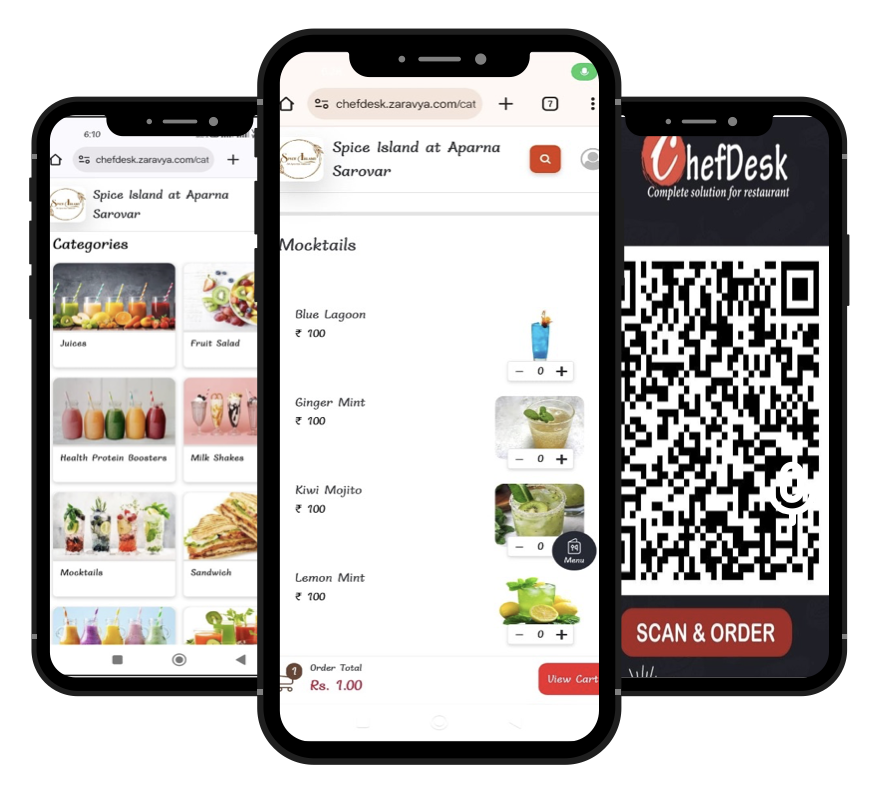
Because the menu already lives in ChefDesk in a structured form — categories, items, variants, option groups, combos, availability, tax treatment — publishing it as a customer-facing digital menu is a projection of existing data, not a second menu to maintain.
You get two hosting choices:
- On your own website — embedded into your existing domain, so the brand experience is entirely yours.
- On a ChefDesk-provided domain — a store-specific URL, live in minutes, no web development required.
Either way, there is one source of truth. Mark an item out of stock on the POS at 9 PM and it disappears from the digital menu immediately. Change a price and it propagates. The stale-PDF-menu problem that kills most DIY WhatsApp ordering simply does not arise.
Orders placed on that storefront enter the same Received state as an aggregator order. From the kitchen's point of view, nothing new has to be learned.
The one genuine difference: on the aggregator channel, the platform owns the delivery leg. On your own storefront, you own it. ChefDesk addresses this by integrating with ONDC-backed delivery platforms to relay orders for last-mile fulfilment — covered in detail in section 6.
4. Three ways a customer can order on WhatsApp
ChefDesk supports three distinct WhatsApp entry patterns. They differ in how much of the journey stays inside the chat, and in what each one demands from the store.
Mode A — Shared ChefDesk number, QR entry (fastest to launch)
The customer scans a QR code on the table tent, bill, or packaging. The scan opens WhatsApp with a pre-filled message addressed to a common ChefDesk WhatsApp number:
Hi #pizza-express, I would like to #order
The customer just presses send.
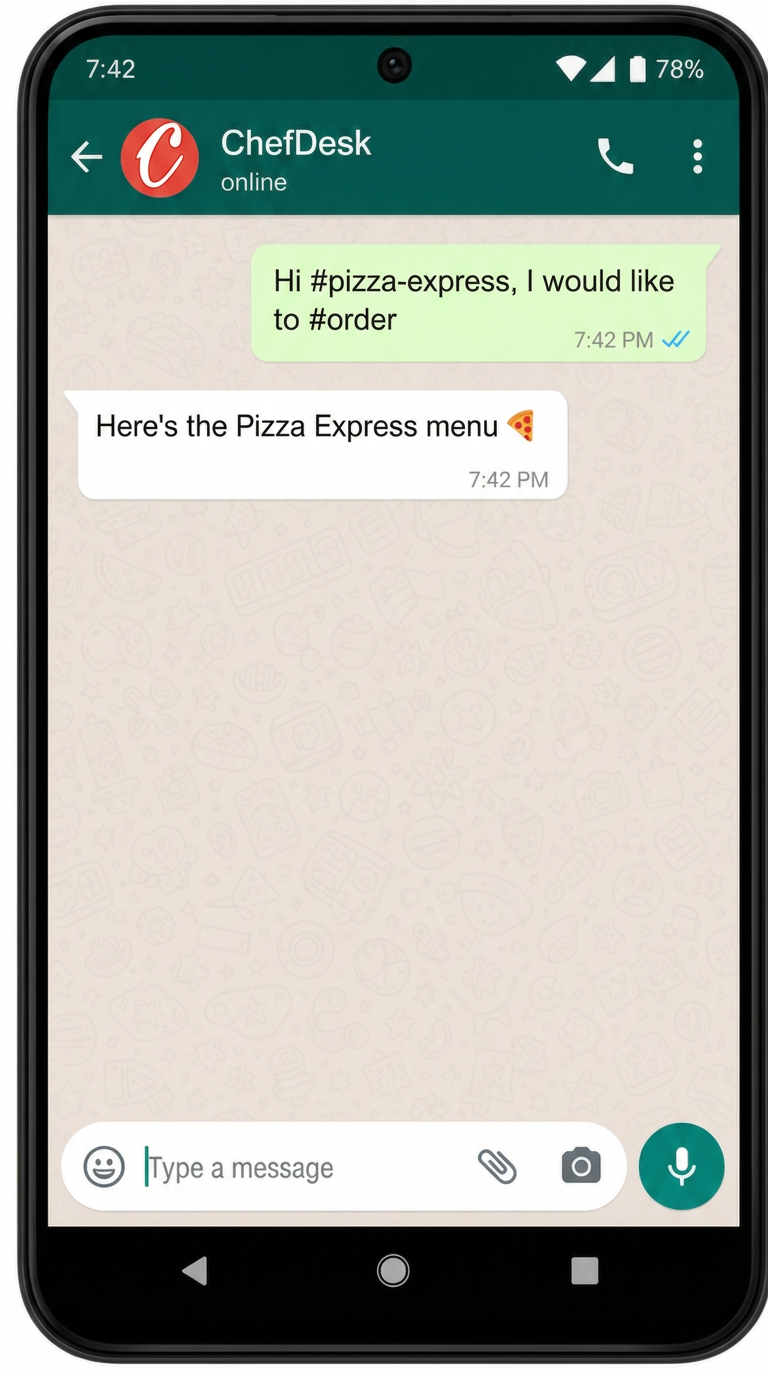
What is happening under the hood: the inbound message is delivered to ChefDesk via a WhatsApp webhook. The handler parses the tokens in the message, identifies which outlet #pizza-express maps to, and responds with a unique, store-scoped ordering URL. The customer then leaves WhatsApp and completes the order on the web storefront.
Trade-off to be clear about: the chat is a doorway, not the counter. It removes the app-download barrier and the "which number do I save?" problem, but the actual browsing happens on the web. For most stores this is the right first step: nothing to procure, nothing to configure, live the day the QR codes are printed.
Mode B — Your own WhatsApp Business number
If the store already has (or wants) its own WhatsApp Business number, the same flow runs on it. The customer simply says "Hi" to start an ordering conversation, and receives the store's menu link.
What you gain: the conversation happens under your brand, on a number customers save in their contacts, and the thread becomes a durable marketing asset. What it costs: you own the number's provisioning, template approvals, and — importantly — the expectation that someone replies when a customer types a question at 10 PM.
Mode C — Full conversational ordering with AI assistance
In this mode the customer never leaves WhatsApp.
The customer can browse through a list interface, or just ask — "suggest me a spicy dish", "is the biryani available?", "what's in the ₹299 combo?" — and get answers grounded in the live menu, including current availability. Payment completes inside WhatsApp via UPI integration. Nobody leaves the app.
Here is that thread, step by step. Tap the reply buttons to move the order forward:
Super Tea Cafe
powered by ChefDesk
Today
Hi
4:36 pmThe strategic payoff of Mode C is not convenience alone: the store ends up with the customer's contact in its own CRM, and can push loyalty offers and promotions to a thread the customer actually reads. (CRM and loyalty mechanics get their own pillar article — this one stops at the order.)
Choosing a mode
| Mode A (shared number + QR) | Mode B (own number) | Mode C (in-chat AI) | |
|---|---|---|---|
| Time to launch | Fastest | Short | Moderate |
| Brand ownership | ChefDesk number | Yours | Yours |
| Customer leaves WhatsApp | Yes | Yes | No |
| Conversion friction | Low | Low | Lowest |
| Staff attention needed | Minimal | Moderate | Low (AI handles Q&A) |
| Best for | First direct-channel experiment | Established brands with repeat customers | High repeat-order volume, delivery-heavy stores |
A sensible path is A → B → C: prove the demand exists with a QR, move it to your own number once volume justifies it, then reduce friction further with in-chat ordering.
5. Why orders travel on a queue, not a static IP
This is the least visible part of the system and arguably the most important. It is also where ChefDesk deliberately diverges from how aggregator integrations usually work.
The conventional model, and why it breaks
Most external ordering platforms expect the store side to expose a stable endpoint — often a static IP or a permanently reachable webhook — to which orders are pushed in real time.
That assumption fails constantly in Indian restaurant conditions:
- Broadband at the outlet is a consumer connection with a dynamic IP.
- The POS machine is switched off, restarted, or moved during service.
- The link drops for eleven minutes at 8:40 PM on a Saturday.
- A router firmware update silently closes the port.
When the push fails, the order does not politely wait. The consumer of the webhook typically has no alternative mechanism to receive the order. In practice, platforms fall back to publishing the order into their own partner app — which means someone at the counter must now watch a tablet, retype the order into the POS, and hope nothing is missed. Every problem the integration existed to solve comes back.
The ChefDesk model: persist first, deliver asynchronously
The order is written to durable storage in the cloud first, then enqueued. The POS is a consumer of that queue, not a server waiting to be called. Consequences:
- No static IP, no port forwarding, no fixed public endpoint at the outlet. The POS reaches out; nothing has to reach in.
- Outages are survivable. If the POS is offline for twenty minutes, orders accumulate in the queue and are delivered in sequence when it reconnects. Nothing is silently dropped.
- Delivery is retried, not abandoned. Transient failures resolve themselves without human intervention.
- Order sequence is preserved, and duplicate delivery is handled idempotently — the same order ID processed twice does not fire two KOTs.
- No parallel tablet. There is never a scenario where the store is asked to watch a second screen because the integration gave up.
This is a small architectural choice with a large operational consequence: it is the difference between a direct channel you can trust during a Saturday rush and one you switch off after the first bad week.
6. Delivery: what ONDC-backed logistics actually gives you
The honest framing: on your own channel, delivery becomes your responsibility. This is the single biggest operational change when moving from aggregator-only to direct, and it deserves a clear-eyed look.
ChefDesk integrates with ONDC-backed delivery platforms, relaying confirmed orders to a logistics provider for last-mile fulfilment. The store does not have to build a rider network to start.
What to evaluate before you rely on it
Logistics economics vary by city, distance band and time of day, so validate these locally rather than assuming:
- Coverage and rider density in your specific pincodes, particularly at peak dinner hours. A network that is thin in your locality at 9 PM will fail you exactly when volume is highest.
- Per-order cost by distance band, and how it behaves in rain and on festival evenings.
- Pickup SLA — how long between "food ready" and rider arrival. Long pickup waits kill food quality and generate the complaints you now have to handle yourself.
- Failure handling — what happens when no rider accepts, and what your fallback is.
The pragmatic answer
Most stores should not run a binary choice. The workable pattern:
- Push self-pickup hard on the direct channel. It carries zero delivery cost, and a meaningful share of customers within 2 km will take a discount to collect. This is the highest-margin order in the entire business.
- Use ONDC-backed logistics as the default delivery mechanism, especially while volumes are small and a dedicated rider cannot be justified.
- Add one in-house rider only when the arithmetic works — roughly, when your daily direct-delivery order count multiplied by the per-order logistics fee exceeds a rider's fully loaded daily cost. Below that line, an owned rider is idle capacity you are paying for.
- Cap your delivery radius tighter than the aggregators do. They optimise for coverage; you should optimise for food quality and complaint volume. A 3–4 km radius with 25-minute deliveries produces far fewer angry customers than a 7 km radius with 45-minute ones.
7. Payments, refunds and reconciliation
Collection. In Mode C, payment completes inside WhatsApp through UPI integration. In Modes A and B, payment happens on the storefront — UPI, cards, wallets — or cash on delivery if you choose to enable it.
A word on COD: it converts better and it also produces refused deliveries, cash-handling risk and rider float problems. Enabling it on day one is a common mistake. Start prepaid-only, and introduce COD later for repeat customers if you need the volume.
Reconciliation. Because direct orders flow through the same sale pipeline, they land in the same day-end reporting as dine-in and aggregator sales, with correct GST treatment. Separately, ChefDesk reconciles Zomato and Swiggy payouts commission-accurately — which gives you the comparison that matters: net realisation per order, by channel, on real data rather than a spreadsheet estimate. Everything in section 10 should ultimately be computed from your own numbers here.
Refunds are covered next, because they are an operational problem before they are a payments problem.
8. Own channel vs aggregator: the honest comparison
| Dimension | Aggregator | Your own channel (ChefDesk) |
|---|---|---|
| Customer discovery | Strong — millions browse the app with no intent toward you specifically | Weak — you must drive every visitor yourself |
| Acquisition cost | Paid via commission + ad spend + discount share | Paid once, via your own surfaces; near-zero marginal cost after |
| Commission | Typically 20–35% of order value | Nil |
| Discount participation | Often contractually expected | Entirely your choice |
| Customer data | Held by the platform | Yours — name, number, order history |
| Delivery | Platform's fleet; your problem ends at handover | Yours to arrange (own riders / ONDC logistics / pickup) |
| Complaint handling | Platform absorbs most of it | You absorb all of it |
| Refunds | Platform decides, often unilaterally, and debits you | You decide, and you carry the cost |
| Rider availability at peak | Deep pool | Depends on your partner and locality |
| Brand experience | Templated listing beside your competitors | Fully controlled |
| Repeat behaviour | Loyalty accrues to the platform | Loyalty accrues to you |
| Operational load | Low | Moderate, and front-loaded |
Read the table as a whole and the strategic conclusion writes itself: aggregators are an acquisition channel; your own channel is a retention channel. They are good at introducing you to strangers. They are an expensive way to keep serving someone who already knows they like your biryani.
Which is why section 12 argues you should run both.
The five-minute business case — unit economics, net realization per order, and what it takes to break even on your own channel.
Read the business case →9. The questions nobody answers: complaints, refunds and bandwidth
This is the section most vendors skip. It is the one that actually determines whether your direct channel survives past month three.
"Swiggy and Zomato used to handle all my complaints. Can I?"
Yes — but only if you design for it before you launch, not after the first angry customer.
Here is the reality check: the aggregator was never absorbing complaints for free. It was resolving them, often by issuing a refund at your expense and debiting your payout, and telling you afterwards. You were paying for that service inside the commission, and you had no say in the outcome. Going direct means you pay for it in staff attention instead — and you get to decide the outcome, and to keep the customer.
Design the flow before you launch.
A workable refund policy, written down and given to your staff:
| Situation | Default action | Who approves |
|---|---|---|
| Missing item | Refund that item's value, or redeliver | Shift manager |
| Wrong item delivered | Full refund of item + goodwill credit | Shift manager |
| Delivery > 20 min beyond promise | Goodwill credit on next order | Shift manager |
| Quality complaint, first instance | Goodwill credit | Shift manager |
| Quality complaint, repeat customer or high value | Partial or full refund | Owner |
| Order never delivered | Full refund, same day | Shift manager |
| Suspected abuse (3rd claim in 60 days) | Investigate, no auto-refund | Owner |
Two rules make this workable in practice: a value threshold below which any staff member can refund without asking (say ₹300 — the argument costs more than the money), and a reason code on every refund, so the weekly review tells you whether the problem is a dish, a rider, a time slot or a packaging choice. Aggregators never gave you that diagnostic.
"Do I have the bandwidth?"
Quantify it rather than guessing. The load has three components:
- Order acceptance — a tap on the POS. Seconds per order. Auto-accept can remove it entirely once you trust the flow.
- Customer conversation — the real cost, concentrated in Modes A and B. In Mode C, the AI layer handles menu questions, recommendations and cart building; a human is needed only for exceptions.
- Exception handling — complaints, refunds, delivery escalations. Empirically the smallest bucket by count and the largest by minutes.
A practical staffing ladder:
| Direct orders/day | Who handles it | Notes |
|---|---|---|
| Under 20 | Existing counter staff, alongside billing | No incremental cost; use Mode A or C |
| 20–60 | One assigned person per shift, part of their duties | Define an SLA: reply within 5 minutes during service |
| 60–150 | Dedicated channel owner during peak hours | Now worth a formal complaint log and weekly review |
| 150+ | Small team, or centralised desk across outlets | Chain-level function; consider own riders |
The honest caveat: if you are a single-outlet owner already working 14-hour days with no manager, launching Mode B — where customers expect a human to answer at 10:30 PM — will fail. Launch Mode A or Mode C instead, keep the conversation surface small, and let the automation absorb the routine.
10. Investment vs return: the actual arithmetic
Replace every illustrative figure below with your own — your commission slab, your logistics quote, your average order value. The framework is what matters.
What you invest
| Cost line | Nature | Notes |
|---|---|---|
| ChefDesk subscription | Recurring | Often already being paid; direct ordering rides on existing POS, menu and inventory setup |
| WhatsApp conversation costs | Per conversation | Small per unit; scales with volume, not with order value |
| Delivery / logistics fees | Per delivered order | The dominant variable cost; zero on self-pickup |
| Payment gateway charges | Per order | UPI is typically negligible |
| Launch collateral | One-time | QR table tents, packaging stickers, bill inserts, standee |
| Promotion | Optional, ongoing | Best spent on owned surfaces first (see next section) |
| Staff attention | Hidden but real | The cost most owners underestimate |
Note what is not on this list: app development, a web build, a separate menu management effort, integration engineering. Those are absorbed by the platform.
What you earn back
Compare contribution per order rather than revenue.
Aggregator order
  Order value                    ₹600
  Commission (25%)              −₹150
  Your share of platform discount −₹100
  Payment / other charges        −₹15
  ─────────────────────────────────────
  Net realisation               ≈₹335

Direct order (delivered via logistics partner)
  Order value                    ₹600
  Commission                        ₹0
  Delivery fee                   −₹45
  Messaging + payment costs       −₹2
  Your own promo (optional)      −₹30
  ─────────────────────────────────────
  Net realisation               ≈₹523

Direct order (self-pickup)
  Net realisation               ≈₹568
Incremental contribution ≈ ₹190 per shifted order in this illustration. Against that, weigh your monthly fixed additions — subscription delta, collateral amortised, and the staff time you are genuinely adding.
Break-even is usually small. If your incremental fixed cost of running the channel is, say, ₹8,000 a month, you break even at roughly 42 shifted orders a month — under two a day. Nearly every store that promotes the channel properly clears that within the first month. The question is not whether it pays back; it is how large a share you can shift.
Setting realistic expectations
- Month 1: 3–5% of delivery orders. This month is about proving the plumbing works, not volume.
- Month 3: 8–15%, if you are consistently promoting on owned surfaces.
- Month 6–12: 15–25% is a strong, achievable outcome for a store with genuine repeat customers.
Anyone promising you 50% in a quarter is selling something. And treat one number as decisive: repeat rate on the direct channel at 30 days. If direct customers are not repeating meaningfully more than aggregator customers, your follow-up is broken and no amount of acquisition will fix it.
11. How to promote your own menu and WhatsApp number
You are not competing with Swiggy for discovery. You are converting people who already know you onto a cheaper channel. That reframing changes where the effort goes.
Owned surfaces first — they cost almost nothing
- Table tent QR with a plain instruction: Scan to order next time — direct from us.
- Bill and bill folder. Every printed bill is an impression you are already paying for.
- Packaging and delivery bags. A sticker on every aggregator delivery is the single highest-leverage placement you have: it reaches a customer who has just decided they like your food, at the moment they like it most.
- The counter question. "Shall I send the bill on WhatsApp?" — the cheapest opt-in mechanism in the business, and it captures consent cleanly.
- Google Business Profile — add the ordering link. Many customers search your name directly and land here.
- Instagram bio and story highlights, WiFi login page, and the standee at the entrance.
Then, and only then, paid
Hyperlocal ads and boosted posts within your delivery radius work, but only after the owned surfaces are saturated. Paid acquisition into a channel with weak follow-up is money set on fire.
Do not out-discount the aggregators
You will lose, and you will train your best customers to wait for a discount. Compete instead on what platforms structurally cannot offer:
- Items available only on direct orders — a signature dish, a chef's special, a larger portion size.
- Free customisation the aggregator listing cannot express: extra spice, no onion, jain, gravy on the side.
- Priority slots on busy evenings for direct customers.
- A visible loyalty balance that grows — the mechanics of which are the subject of a separate pillar article.
- A human who replies in two minutes. No platform will ever match this.
12. The mixed model: running both without cannibalising yourself
Yes — and it is the correct strategy for almost every store. Turning off aggregators is a decision for a small number of brands with genuine pull. For everyone else, the platforms are a customer acquisition engine you do not have to build.
The operating principle: let aggregators buy you customers; use your own channel to keep them. Every aggregator order is a paid acquisition event. Your job is to make sure it is the last full-price acquisition for that customer.
Practical guardrails for running both:
- Review your platform agreements on price parity before setting different menu prices across channels. Differentiate on non-price value — exclusives, portion, customisation, speed — which is both safer and more durable.
- Keep one menu source. ChefDesk publishes to both, so an out-of-stock mark is honoured everywhere at once. Divergent menus across channels are how stores end up cancelling orders and damaging their aggregator ratings.
- Manage kitchen capacity as one pool. During a rush, both channels draw on the same tandoor. The state machine gives you a single live view; use it to pause a channel rather than blowing prep times on both.
- Do not degrade the aggregator channel deliberately. Slow acceptance and frequent rejections hurt your rating, which hurts the acquisition engine you are relying on.
- Track net realisation per channel monthly. Let the data, not ideology, decide how hard you push each one.
13. Where ChefDesk sits in your ecosystem
The shape of the diagram is the argument: channels multiply, the core stays single. Add ONDC buyer apps, a new aggregator, a kiosk, a drive-through — each becomes one more arrow into the same state machine, and inherits KOT routing, inventory deduction, GST treatment and reporting for free.
The alternative — a separate ordering tool bolted alongside your POS — gives you two menus to maintain, two sets of numbers to reconcile, and a food-cost report that stops being true the moment the new channel grows.
14. Rollout plan
| Phase | Duration | What you do | What "done" looks like |
|---|---|---|---|
| 1. Foundation | Week 1 | Verify menu is complete; link recipes and sub-recipes to ingredients; confirm KOT/KDS routing | Inventory variance on existing channels is already trustworthy |
| 2. Publish | Week 1–2 | Publish digital menu to ChefDesk domain or your site; set delivery radius, hours, prep times | A working store URL; 20 internal test orders passed end to end |
| 3. Delivery | Week 2 | Connect ONDC-backed logistics; enable self-pickup; set the radius conservatively | Test deliveries completed in each distance band |
| 4. WhatsApp | Week 2–3 | Launch Mode A with QR; print collateral; brief staff on the one-line pitch | Live orders arriving via QR scan |
| 5. Promote | Week 3–4 | Stickers on every delivery bag, table tents, bill inserts, Google Business Profile, Instagram | Direct-channel share measurable in reports |
| 6. Operate | Ongoing | Publish the refund policy; assign the channel owner; hold a weekly complaint review | Reason-coded refund log; complaint rate trending down |
| 7. Deepen | Month 2–3 | Move to your own number (Mode B) or in-chat AI ordering (Mode C); layer on CRM and loyalty | Repeat rate on direct clearly above aggregator |
FAQ
Do I need a static IP or any network setup at the outlet? No. The POS consumes orders from a queue, so nothing needs to reach into your network. No port forwarding, no fixed public endpoint.
What happens to orders if my internet drops mid-service? They persist in the cloud and queue up. When the POS reconnects, they are delivered in sequence, without duplicates. You will never be asked to watch a separate tablet as a fallback.
Do WhatsApp orders deduct inventory? Yes — identically to dine-in and aggregator orders. The recipe graph is resolved on sale upload regardless of channel.
Can I run my own website instead of a ChefDesk domain? Yes. The digital menu can be published on your own site or on a ChefDesk-provided domain, from the same menu source.
Do I have to buy a WhatsApp Business number to start? No. Mode A runs on a shared ChefDesk number with QR-based store resolution. Move to your own number when volume justifies it.
Can customers pay inside WhatsApp? In the AI-assisted conversational mode, yes — via WhatsApp UPI integration. In the QR and own-number modes, payment completes on the storefront.
Will this hurt my Swiggy and Zomato ratings? Not if you keep one menu source and manage kitchen capacity as a single pool. Ratings suffer when stores run divergent menus and start rejecting orders — which is precisely what a unified core prevents.
What if I cannot get riders at peak? Push self-pickup, cap your radius, and set honest prep-and-delivery promises on the storefront. An under-promised 30-minute delivery generates fewer complaints than an over-promised 20-minute one.
The short version
WhatsApp ordering in ChefDesk is not a new product bolted onto a POS. It is a new entry point into an order lifecycle that already exists — the same state machine that handles Swiggy and Zomato, the same KOT routing, the same recipe-linked inventory deduction, the same GST-compliant sale.
What changes is who owns the customer, who owns the delivery, and who keeps the 25–35%.
The architecture makes the first part easy. This article has tried to be equally clear about the second and third.
The same argument in five minutes — commissions, net realization and the mixed model.
Read the business case →Next in this series: CRM and loyalty in ChefDesk — turning a direct order into a repeat customer.
Start here: Publish your digital menu and go live on WhatsApp →