What devices does ChefDesk KDS run on?+
It's an Android application, so it runs on large mounted displays, tablets and phones from any brand you choose. There's no proprietary terminal and no certified device list — you buy from the open market and own the hardware.
Can I get KOTs on a phone instead of buying a screen?+
Yes. For small outlets, cloud kitchens and single-cook kitchens, orders can be delivered straight to a phone with the same ticket view, timers and bump action. No printer, no paper rolls and no wall-mounted screen required.
How do timers and delay warnings work?+
Each ticket carries a send time and a running timer, and individual items track their own elapsed time. When an item exceeds its configured preparation time it's flagged with a warning, so a delay is visible to the kitchen before anyone on the floor has to ask about it.
Can I set different preparation times for different dishes?+
Yes. Expected times are configured per item or per category, so a slow-cooked dish and a quick one aren't measured against the same clock. Set these realistically — too tight and every ticket shows red, which teaches cooks to ignore the warnings.
Does the kitchen tell the floor when food is ready?+
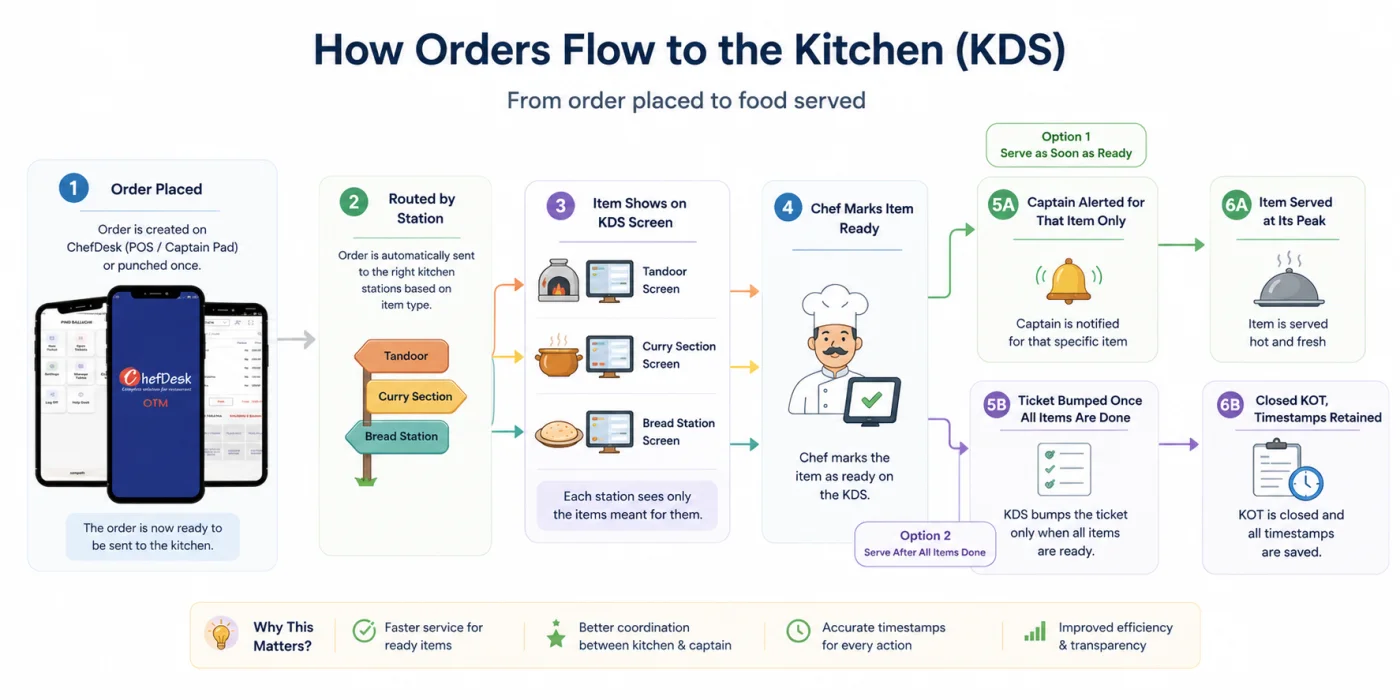
Yes, and per item rather than per ticket. A chef marks each dish ready as it's plated, and the captain who took that order is alerted about that specific dish on their captain pad — the handheld order-taking machine, sometimes called an OTM. Nobody walks to the pass to check.
Can the chef mark individual items ready, or only the whole order?+
Individual items. A ticket's items are cooked at different stations and finish at different times — a raita in a minute, a biryani in twenty. Per-item readiness means fast dishes go out at their peak, and each station can mark its own work done without waiting for or blocking the others.
Can I route different items to different kitchen stations?+
Yes. Items route to the station that cooks them — hot line, tandoor, cold section, dessert, bar — and each screen shows only its own work.
What if a cook bumps a ticket by mistake?+
Bumped tickets move to the Closed KOT view rather than being deleted, so a ticket can be found and recalled. Timestamps are retained either way for reporting.
Does the KDS work if the internet goes down?+
Yes. Orders continue to reach the kitchen from your billing terminals and captain devices, tickets display, timers run and bumps register. Data syncs to the cloud when the connection returns.
Can I see how many portions of a dish are pending across all tables?+
Yes, and it's one of the biggest practical advantages of a KDS over paper. A consolidated panel totals pending quantities across every open ticket, so if three tables have ordered chicken tikka masala the chef sees a single line reading three. Those portions can be cooked together in one pan and one heat cycle, which saves time, gas and ingredient waste and keeps them consistent. Paper KOTs cannot do this — each chit describes one order only.
How much difference does batch prep actually make?+
It depends on menu concentration. Most Indian restaurants sell a long menu but take most of their volume from a short list of dishes, which is exactly the condition where aggregation pays. The effect also grows with volume: at low covers a chef can hold the pattern mentally, but during a rush they can't — and that's when the kitchen needs the efficiency most.
Do I have to remove my KOT printers?+
No. Screens and printers can run together off the same order flow. Most kitchens keep printers during the transition, and some keep one permanently at a particular station.
Is a consumer tablet durable enough for a kitchen?+
It's not sealed the way purpose-built KDS hardware is, so mount it away from direct steam and the range line, use a protective case, and give it fixed power. Treat a kitchen device as something you may replace every couple of years — at market hardware prices, that still costs less than proprietary terminals.
What reporting does the KDS produce?+
Average preparation time by item and by station, tickets exceeding target by hour, and station-level bottleneck analysis — so you can see where and when the kitchen falls behind.
How long does implementation take?+
Usually a day for station mapping, installation and training, plus a week of running before prep times settle. Most kitchens run printers in parallel for the first few days.