Food Court POS

Food Court Billing Software with Multi-Vendor Settlement

One system, many kitchens. Bill across every stall, route each order to the right kitchen, and settle vendor payouts automatically at close — with a revenue record neither side has to take on trust.

  • Vendor-wise settlement
  • Prepaid and RFID cards
  • Per-stall kitchen routing
  • Commission auto-deduction
  • Works offline
  • One dashboard for the operator

Everything you need in one platform

1

Vendor-wise sales attribution

Every line item is tagged to the stall that made it — billed at a central counter, a kiosk or the vendor's own terminal. One customer payment splits across multiple vendors automatically.

2

Automated settlement and commission

Set each vendor's terms once — flat percentage, revenue-share slab, minimum guarantee or fixed rent plus percentage. The system deducts commission and produces a payout statement both sides can see.

3

Prepaid, RFID and wallet

Issue prepaid or RFID cards, top up at a kiosk or counter, and let customers tap at any stall. Configure validity, security deposit, PIN policy and refund rules for unused balance.

4

Order routing to the right kitchen

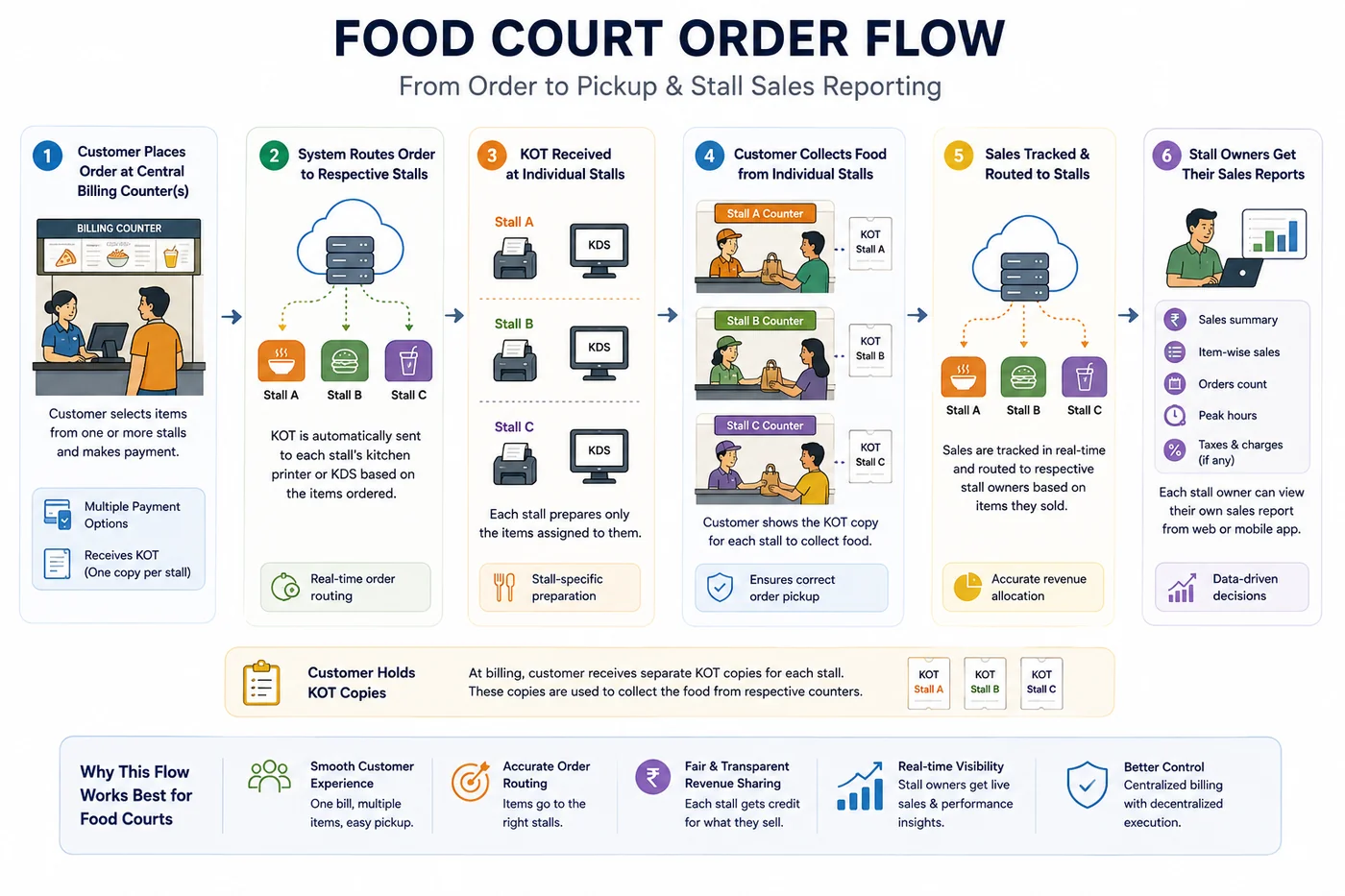
A single order containing items from four stalls splits automatically and prints or displays at each of those four kitchens only. Each stall sees its own queue and nothing else.

5

Token and order-ready displays

Customers get a token at payment and watch a screen for it. Kitchens mark items ready and the display updates — so people wait at tables instead of at the window.

6

Self-service kiosks and QR ordering

Customers browse every stall's menu in one place, build a mixed order and pay once. Kiosks absorb queue during rush without adding cashier headcount.

7

Per-vendor menus and pricing

Each stall controls its own items, prices and offers, while the operator runs court-wide campaigns — a lunch discount, a wallet top-up bonus — across all of them.

8

GST and invoicing across vendors

Each vendor carries its own GSTIN, tax rates and HSN codes, and invoices are generated accordingly. Whether the vendor or the operator raises the bill is configurable.

9

Works offline

Billing continues locally during an outage — including card transactions — and syncs when connectivity returns. Food courts often sit in basements behind mall firewalls.

10

Central operator dashboard

Live sales by stall, hourly footfall curve, payment mix, wallet float outstanding, and per-vendor performance against target. Compare stalls, days and locations.

11

Vendor-facing reports

Give each tenant a login to see only their own sales, item performance and settlement statements. Transparency removes most of the reason disputes start.

12

Aggregator ready

Route Swiggy and Zomato orders to the correct stall kitchen without human triage, and keep the revenue attributed to that vendor.

What is food court billing software?

Food court billing software is a multi-vendor point-of-sale system where several independent food businesses trade under one roof, share a customer and a seating area, and need their revenue separated cleanly at the end of every day. The distinguishing problem isn't billing speed. It's attribution and settlement. A customer buys a biryani from one stall, a coffee from another and a dessert from a third, possibly on one payment. Every rupee has to land against the right vendor, minus the right commission, in a record the operator and the vendor both accept without argument. That is why a food court cannot run on ordinary restaurant POS software. Restaurant POS assumes one owner, one menu, one bank account. A food court has ten of each, plus a landlord in the middle who needs visibility into all of it.

Food court order flow diagram showing the journey from order to pickup and stall sales reporting
From order to pickup and stall sales reporting — one payment, multiple vendors, automatic settlement.

Two ways to run a food court — and what each needs

Before choosing software, decide which model you're operating. Most confusion in food court POS buying comes from vendors quoting for one model while the operator is running the other. ChefDesk supports all three — which one you pick should follow your tenancy agreements, not your software.

  • Centralised billing (single cashier or kiosk): customers order and pay at a common counter, orders route electronically to whichever stall is making the item, and stalls handle no money at all. Good for corporate cafeterias, campuses and ticketed venues. Needs per-stall KDS or token printers, a pickup display, and a settlement engine that splits one payment across several vendors.
  • Distributed billing (POS at each stall): each stall bills its own customers on its own terminal and the operator sees a consolidated view without sitting in the transaction. Good for mall food courts with brand tenants who insist on their own billing and GSTIN. Needs per-vendor POS with independent menus and a central aggregating dashboard.
  • Hybrid: a shared prepaid card or wallet works at every stall, but each stall bills on its own terminal — the card system provides the settlement record.

The problems this actually solves

Every one of these is a cost the operator is already paying, usually without a line item for it.

  • Settlement disputes eat the relationship. When the operator's number and the vendor's number don't match, someone reconciles manually on a Saturday and the renewal conversation gets harder. A system-generated, vendor-visible sales record removes the argument.
  • Cash at ten counters is ten points of leakage. Under-ringing and counting errors are hard to detect when each stall handles its own float — and in a commission model, under-reported sales are a direct cost to the operator.
  • Lunch rush is 90 minutes long. Most of the day's volume lands in a narrow window, and queues at the payment point — not the kitchens — are usually the binding constraint. That's what prepaid cards and kiosks exist to fix.
  • Commission calculation is manual almost everywhere. Different vendors on different percentages, some on minimum guarantee versus revenue share, some on promotional terms. Doing that in Excel across twelve tenants is where errors live.
  • Nobody knows which stall is underperforming until it fails. Per-stall daily revenue makes a struggling tenant visible months earlier, while the mix can still be changed.

Who ChefDesk is for

This page is written for the operator in the middle — a mall operator, facilities manager or corporate admin head — not for a single owner-operator. If you run one outlet inside the court, our cafe billing software and restaurant billing software pages are the better fit.

  • Mall food courts — multiple brand tenants, commission or revenue-share terms, shared seating, and a need for auditable numbers in the tenancy relationship.
  • Corporate cafeterias and tech park food courts — subsidised meals, employee wallets or card entitlements, heavy 12–2 PM concentration, monthly reconciliation with HR or admin.
  • Campus and hostel food courts — student prepaid accounts, meal plan entitlements, parent top-ups, and spend caps.
  • Hospital and airport food courts — long operating hours, multiple shifts, high transaction counts, strict audit expectations.
  • Cloud kitchen clusters and shared kitchens — several brands from one facility with delivery orders that still need per-brand attribution and settlement.
  • Event venues, stadiums and exhibition grounds — temporary multi-vendor setups where cashless issuance, fast settlement and end-of-event refunds all matter in a compressed window.

What you need to get started

A typical food court goes live in two to five days depending on stall count. Most of that time is spent on vendor menus and settlement terms, not on installation.

  • Billing terminals — Android tablets or Windows PCs at counters and/or stalls.
  • Kitchen — KDS screens or 80mm thermal printers per stall.
  • Cards — RFID cards and readers, if you're running a cashless model.
  • Kiosk — optional self-service kiosk for ordering and top-ups.
  • Displays — a token / order-ready screen for the seating area.
  • Network — local network with offline fallback at each terminal.

How rollout works

Six steps, with the first settlement cycle treated as part of the implementation rather than an afterthought.

  • Model confirmation — centralised, distributed or hybrid, based on your tenancy agreements.
  • Vendor onboarding — menus, prices, tax details and commission terms configured per stall.
  • Hardware setup — terminals, kitchen routing, card readers and displays.
  • Staff training — cashiers, stall staff and the operator's admin team, trained separately because they use different parts of the system.
  • Soft launch — one or two days running live with support on site.
  • First settlement cycle — we walk through the first payout run with you and each vendor, since that's the moment trust in the system is established or lost.

Food court billing software vs. the alternatives

Cash at each stall, coupon books and standard restaurant POS all fail on the same axis: they can't attribute and settle multi-vendor revenue without manual work.

  • Vendor-wise sales attribution — manual and disputed with cash, a physical count with coupons, unsupported on single-owner restaurant POS, automatic in ChefDesk.
  • Commission auto-deduction — a spreadsheet in every alternative, built in here.
  • One payment across multiple stalls — not possible with cash or standard POS, partial with coupons, native in ChefDesk.
  • Prepaid / RFID cashless — paper-only at best elsewhere.
  • Order routing to the correct kitchen — verbal or coupon-based otherwise; restaurant POS assumes a single kitchen.
  • Operator-level dashboard and vendor self-service reports — only in a purpose-built multi-vendor system.
  • Offline billing — varies on generic POS, guaranteed here including card transactions.

Frequently Asked Questions

How does food court billing software handle vendor settlement?+

Every item sold is attributed to the stall that produced it, regardless of where it was billed. At the end of your settlement cycle the system totals each vendor's gross sales, applies their agreed commission or revenue-share terms, and generates a payout statement. Both operator and vendor see the same underlying transactions, which is what prevents disputes.

Can a customer pay once for items from different stalls?+

Yes. A single order can include items from several vendors, taken at a central counter, kiosk or QR menu. Payment is collected once, the order routes to each relevant kitchen separately, and the revenue splits to the correct vendors automatically.

Does it support prepaid or RFID cards?+

Yes. Customers top up a card at a kiosk or counter and tap at any stall. You can configure validity, minimum balance, security deposit, PIN requirements and refund rules for unused balance. Card transactions work offline, which matters in basement and mall locations.

Do individual vendors get their own reports?+

Yes. Each vendor can have a login showing only their own sales, item performance and settlement statements. Operators generally find that giving vendors this visibility ends most reconciliation arguments before they start.

How is GST handled when several vendors bill under one system?+

Each vendor holds its own GSTIN, tax rates and HSN codes, and invoices are generated on that basis. Whether the invoice is raised by the vendor or by the operator has genuine GST implications and depends on how your tenancy and billing arrangement is structured — decide that with your CA, and we'll configure the system to match either way.

Will it work if the internet goes down during lunch rush?+

Yes. Billing and card transactions run locally and continue through an outage, syncing to the cloud once connectivity returns. Given how many food courts sit in basements behind restrictive mall networks, this is a core requirement rather than an edge case.

Can each stall keep its own menu and prices?+

Yes. Vendors control their own items, prices and promotions independently. The operator can separately run court-wide campaigns across all stalls.

How does the kitchen know what to make?+

Orders route automatically to the correct stall's kitchen display or printer. Each kitchen sees only its own items and marks them ready, which updates the customer-facing token display.

Is it suitable for a corporate cafeteria rather than a mall?+

Yes. Corporate cafeterias typically use employee wallets or card entitlements, subsidised pricing, and monthly reconciliation with admin or HR. All of that is supported, including spend caps and department-wise reporting.

How many stalls can it handle?+

There's no practical limit for a single food court. Multi-location operators can also run several courts under one account with consolidated and per-location reporting.

How long does implementation take?+

Two to five days for most food courts, depending on the number of vendors. The time goes into menu configuration and settlement terms rather than installation.

What happens to unused prepaid card balance?+

Refund rules are configurable — refund at exit, carry forward, expire after a set period, or retain a security deposit. Set the policy to match what you've committed to your customers.

Not sure which setup fits your outlet?

Compare single-terminal, multi-terminal, LAN and captain-app setups — or answer a few questions and get a recommendation in two minutes.

Ready to Transform Your Restaurant?

Join thousands of successful restaurants. Book a demo today and see ChefDesk in action

No credit card required • 30-day free trial

Book a demo appointment