QSR Billing Software

QSR Billing Software Built for Volume and Multiple Counters

Every terminal works on its own — cloud-connected, offline-capable, and independent of any local server. Add a counter for the lunch rush without adding infrastructure, and take payments on UPI without paying card terminal fees.

  • No local server required
  • Every terminal works offline
  • Token and order-ready displays
  • Self-service kiosks
  • Integrated UPI callbacks
  • Aggregator sync
  • GST-ready billing

Features built for quick service

1

Counter billing at speed

Fast movers pinned to the first screen, combos in one tap, modifiers without menu drilling. Staff bill confidently within an hour of training, which matters when counter staff turn over.

2

Multiple independent counters

Run as many billing terminals as your queues need. Each is independent, each works offline, and each shares the same menu and reporting. Open an extra counter for the lunch rush and close it after — no licence process, no configuration.

3

Token management

Every order generates a token at payment. The kitchen marks it ready, the customer-facing display updates, and the customer collects. This is what keeps people at tables instead of crowding the counter.

4

Order-ready and dual-screen displays

A customer-facing screen shows the order being built and the amount due, which cuts disputes and speeds confirmation. A separate order-ready display calls tokens for collection.

5

Self-service kiosks

Customers order and pay themselves. Kiosks absorb queue during peak without adding cashier headcount, and typically raise average ticket because the upsell prompt never forgets to ask.

6

Combo meals and upsell prompts

Build meal combos with automatic pricing, set add-on suggestions that appear as the order is taken, and run time-based offers that switch automatically.

7

KDS and kitchen routing

Orders route to the right station — fryer, grill, assembly, beverages — with timers flagging ageing tickets. Paper tickets disappear and so do re-fires.

8

Aggregator integration

Swiggy and Zomato orders land in the same queue and the same reports as counter orders, so you are not reconciling three systems at close.

9

Multi-outlet menu and price control

Push a menu, price or offer change from one dashboard to every outlet — subject to the sync procedure below. Compare outlet performance side by side.

10

Inventory and food cost

Recipe-mapped inventory deducts ingredients on every sale, with low-stock alerts before you run out mid-service. Item-level margin shows which menu items are actually carrying the business.

11

GST-ready billing

Item-wise rates and HSN codes, compliant invoices printed or sent to WhatsApp, and filing-ready tax reports.

12

Reports built for throughput

Bills per hour and per counter. Average service time. Average ticket by counter and by staff member. Item velocity by hour, so you know when to prep the second batch. Payment mix, so you can see your UPI share climbing.

What is QSR billing software?

QSR billing software is a point-of-sale system built for throughput. A quick service restaurant sells a large number of low-value orders in a short window, usually across several counters at once, with the customer paying before the food is made and waiting for a token to be called. That is a different engineering problem from any other food business. A fine dining room needs pacing — see fine dining POS software. A bakery needs production tracking. A QSR needs the same order, the same price and the same offer to appear identically on six terminals at once, with none of them slowing down or failing when one of them does. Everything below follows from that.

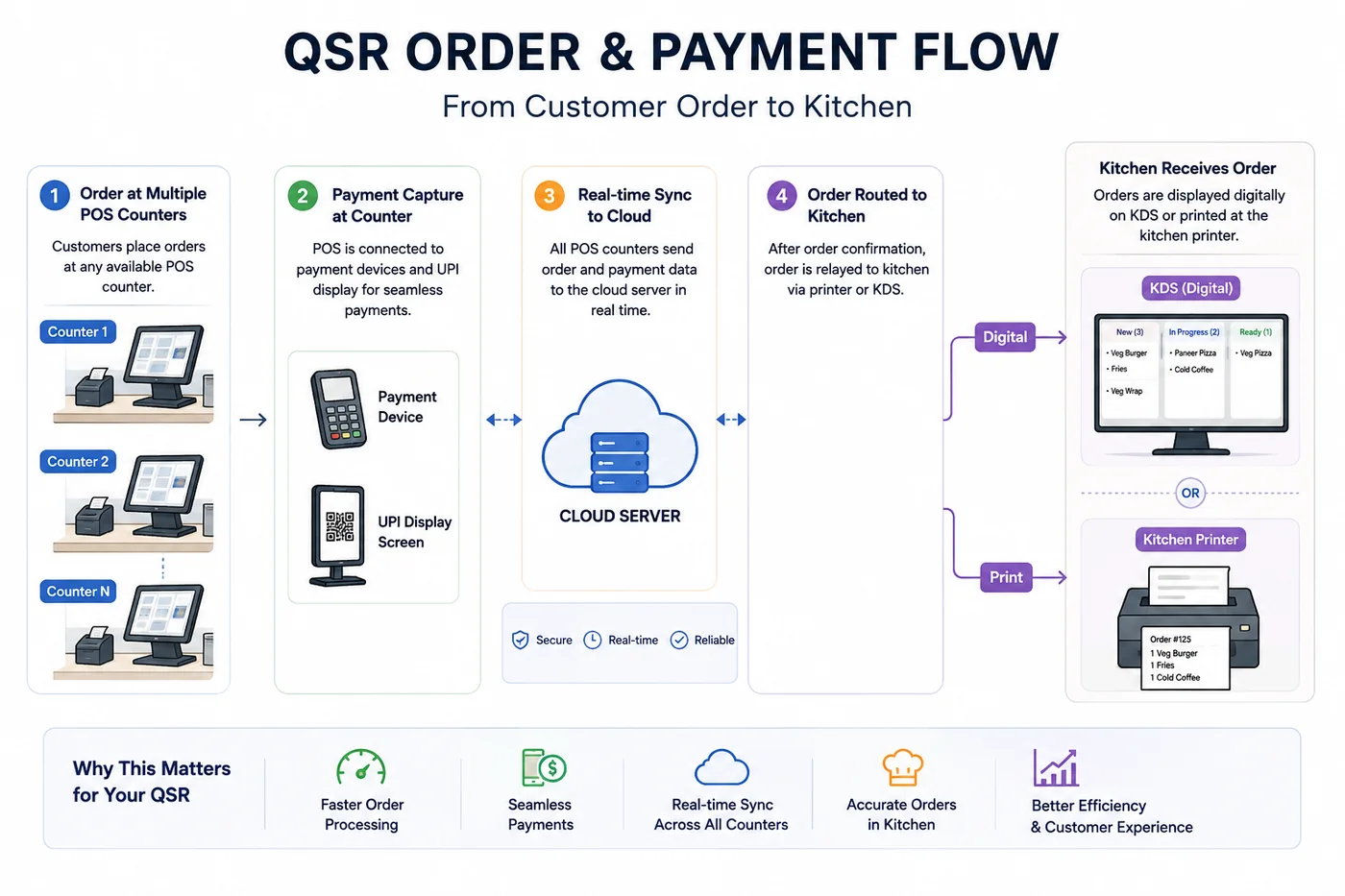
QSR order and payment flow: from customer order at multiple POS counters through payment capture, real-time cloud sync, kitchen routing via KDS or printer, to order collection
QSR order & payment flow — from counter order to kitchen display or printer

Architecture: why there is no local server

Most multi-terminal POS systems from the previous generation worked on a client-server model. One machine in the back office ran the database, and every billing counter was a client talking to it over the local network. That design has two failure modes any QSR operator will recognise: if the server goes down, every counter stops — not one counter, all of them — and someone has to own the server, with backups, updates, power protection, cabling and a person to call when it misbehaves. ChefDesk works differently. Each terminal connects directly to the centralised cloud server, and each terminal is fully independent.

  • Every terminal holds its own local database and bills whether it is online or offline
  • Terminals do not depend on each other — one failing does not touch the others
  • There is no local server to buy, maintain, back up, or lose
  • Adding a counter means installing the app on a device and logging in — no cabling, no reconfiguration, no vendor visit
  • During an outage every counter keeps billing locally and syncs when connectivity returns, so an outage delays reporting rather than stopping service

Menu sync: how to keep every counter consistent

Because each terminal holds its own local copy of the menu — which is precisely what makes offline billing work — a price change or a new offer reaches a terminal when that terminal syncs. A counter that has not synced is still billing yesterday's prices. That is not a flaw to work around; it is the trade-off that buys you offline independence. But it does mean menu changes need an operating procedure rather than good intentions. Ours:

  • Set a fixed daily sync — build it into the opening checklist so every terminal syncs before first billing
  • Sync again after any mid-day change: new offer, price revision, item marked out of stock
  • Make it one person's job at each shift — "everyone should sync" means nobody does
  • Verify, don't assume: the dashboard shows each terminal's last sync time
  • Time your price changes for opening rather than mid-rush, so there is a natural sync point first

Payments: don't pay card terminal fees you don't need to

QSR margins are thin and transaction volume is high, which makes payment acceptance costs a real line item rather than a rounding error. Card terminals cost you twice — a monthly rental for the device, and a percentage of every transaction. On a high-volume, low-ticket business, that percentage compounds fast. UPI QR acceptance avoids both: no terminal rental, and no per-transaction merchant fee on standard UPI collections. Digital UPI display devices — the screen or soundbox units that show the QR and announce payment confirmation — cost a fraction of what a card terminal costs to rent over a year. Buy one per counter outright and be done. ChefDesk integrates UPI callbacks directly with payment providers including Paytm and NoCash. When the payment succeeds, the provider notifies ChefDesk and the bill settles automatically against the order. The cashier does not verify anything manually, does not mark the bill paid by hand, and does not hold up the queue. The results: faster queues, no manual reconciliation of UPI collections at close, and no disputes about whether a payment landed. You can still take cards — ChefDesk works with standard card terminals for customers who want them.

Who this is for

QSR formats where speed is the primary operational metric and queues run in parallel.

  • Fast food outlets and burger, pizza and sandwich counters — multiple queues, combo-heavy menus
  • QSR chains — several outlets needing identical menus, prices and offers, with central control and per-outlet reporting
  • Food court stalls — high volume in a narrow window. If you are the operator rather than the tenant, see [food court billing software](/food-court-billing-software) for vendor settlement
  • Takeaway and delivery-led outlets — counter orders and aggregator orders in one queue
  • Cafe-format counters with a single till — see [cafe billing software](/cafe-billing-software)
  • Campus and corporate QSRs — extreme concentration into a 90-minute window, where extra counters during peak are the only way to clear the queue

What you need to get started

No local server. No structured cabling. No back-office machine. Because there is no server dependency, hardware is your choice from any brand on the market — see restaurant billing app for Android for device guidance, particularly the specification tiers, which matter more at QSR bill volumes than anywhere else.

  • Terminals: Android tablets, Android touch POS, or Windows PCs — any brand
  • Printers: 58mm or 80mm thermal, per counter and per kitchen station
  • Kitchen: KDS screens or thermal printers per station
  • Customer display: dual screen or a second display per counter
  • Token display: any screen the seating area can see
  • Payments: digital UPI display device per counter; card terminal optional
  • Network: broadband with mobile fallback — every terminal bills offline regardless

How rollout works

Most single outlets go live in two to three days. Chains typically pilot one outlet, settle the menu structure and SOPs there, then roll out.

  • Menu and combo build — items, combos, modifiers, offers and tax rates
  • Counter and kitchen setup — terminals, station routing, token and customer displays
  • Payment configuration — UPI provider integration and callback testing, plus card terminals if you are using them
  • Sync SOP agreed — who syncs, when, and how it is verified, before go-live rather than after the first price mismatch
  • Staff training — cashiers, kitchen and management, by role
  • Soft launch — one peak service with support available

QSR billing software vs. the alternatives

Against a cash register, a client-server POS and a cloud-only POS, the differences that matter at a QSR counter are these. For the wider platform view, see restaurant POS software.

  • Local server required: cash register no, client-server yes, cloud-only no, ChefDesk no
  • One terminal failing stops others: client-server often; ChefDesk never
  • Bills offline: client-server only on LAN, cloud-only usually not, ChefDesk yes on every terminal
  • Add a counter during peak: client-server needs a vendor visit; ChefDesk is install and log in
  • Integrated UPI confirmation: rare elsewhere, standard on ChefDesk
  • Token management and kitchen routing, plus central multi-outlet control, on ChefDesk

See it running your peak hour

Book a demo and we will set up your actual menu, combos and counter count, then walk through a rush — multiple terminals billing at once, an internet outage mid-service, and a UPI payment confirming automatically. Want to sanity-check your menu margins first? Try the food cost calculator.

Frequently Asked Questions

Do I need a local server to run multiple billing counters?+

No. Each terminal connects directly to the centralised cloud server and operates independently, so there is no back-office machine to buy, maintain or back up. It also means one terminal failing has no effect on the others — unlike client-server setups, where a server failure stops every counter at once.

What happens to my counters if the internet goes down?+

Every terminal keeps billing on its own local database, independently of the others and of the cloud. Nothing queues and no customer is turned away. Each terminal syncs its transactions once connectivity returns, so an outage delays reporting rather than stopping service.

How do I make sure all counters show the same price and offers?+

Because each terminal holds a local menu copy for offline billing, changes apply when a terminal syncs. Run a fixed daily sync as part of the opening checklist, sync again after any mid-day change, make it one named person's responsibility per shift, and verify last-sync times on the dashboard. Followed consistently, every counter stays identical all day.

Can I add a billing counter during peak hours?+

Yes. Install the app on a device and log in. There is no cabling, no server registration and no vendor visit, so an extra counter can be opened for a lunch rush and closed afterwards.

Can I avoid card terminal fees?+

Largely, yes. Card terminals carry both a rental and a per-transaction fee, while standard UPI QR collection carries neither. Digital UPI display devices cost a fraction of a year's card terminal rental and can be bought online. Most QSR customers will scan without prompting, so moving the bulk of transactions to UPI is one of the simplest margin gains available.

How does ChefDesk confirm a UPI payment?+

Through integrated callbacks with payment providers including Paytm and NoCash. When the payment succeeds, the provider notifies ChefDesk and the bill settles automatically against the order — no cashier checking a phone, no manually marking bills paid, and no manual reconciliation of UPI collections at close.

Can I still accept cards?+

Yes. ChefDesk works with standard card terminals alongside UPI. The aim is not to refuse cards, only to stop paying terminal fees on transactions that would have been UPI anyway.

Does it handle token numbers and order-ready displays?+

Yes. Each order generates a token at payment, the kitchen marks items ready, and the customer-facing display updates so customers wait at tables rather than crowding the counter.

Do self-service kiosks work with the same system?+

Yes. Kiosk orders enter the same queue, route to the same kitchen stations and appear in the same reports as counter orders. Kiosks absorb peak queue without extra cashier headcount and generally lift average ticket through consistent upsell prompts.

Can I control menus and prices across several outlets centrally?+

Yes. Push menu, price and offer changes from one dashboard to every outlet, subject to the same sync procedure — outlets pick up changes as their terminals sync.

What hardware do I need?+

Android tablets, Android touch POS terminals or Windows PCs, from any brand, plus thermal printers and displays. There is no proprietary hardware and no local server. At QSR bill volumes, device specification matters — see our Android device guidance for what to buy.

How long does implementation take?+

Two to three days for a single outlet. Chains usually pilot one location to settle the menu structure and sync SOPs, then roll out to the rest.

Not sure which setup fits your outlet?

Compare single-terminal, multi-terminal, LAN and captain-app setups — or answer a few questions and get a recommendation in two minutes.

Ready to Transform Your Restaurant?

Join thousands of successful restaurants. Book a demo today and see ChefDesk in action

No credit card required • 30-day free trial

Book a demo appointment